[Skip to content](https://www.t-mobile.com/dialed-in/accessories/what-is-magsafe#maincontent)

Hey, looks like you need help finding something. I am here to chat if you have any questions
Skip to main content Skip to footer
[Wireless](https://www.t-mobile.com/)
[Business](https://www.t-mobile.com/business)
[Prepaid](https://prepaid.t-mobile.com/home)
[Internet](https://www.t-mobile.com/home-internet)
[](https://www.t-mobile.com)
Log in
[Plans](https://www.t-mobile.com/cell-phone-plans)
[Unlimited Phone Plans](https://www.t-mobile.com/cell-phone-plans)[Unlimited Age 55+](https://www.t-mobile.com/cell-phone-plans/unlimited-55-senior-discount-plans)[Military & Veterans](https://www.t-mobile.com/cell-phone-plans/military-discount-plans)[First Responder](https://www.t-mobile.com/cell-phone-plans/first-responder-discounts)[College Students](https://www.t-mobile.com/cell-phone-plans/student-discounts)[5G Home Internet Plans](https://www.t-mobile.com/home-internet/plans)[Fiber Internet Plans](https://www.t-mobile.com/home-internet/fiber)[Watch & Tablet Plans](https://www.t-mobile.com/cell-phone-plans/affordable-data-plans)[Prepaid Phone Plans](https://prepaid.t-mobile.com/prepaid-plans)[Business Phone Plans](https://www.t-mobile.com/business/wireless-business-plans)
[Phones & devices](https://www.t-mobile.com/cell-phones)
[Cell phones](https://www.t-mobile.com/cell-phones)[5G phones](https://www.t-mobile.com/5g/phones)[Tablets](https://www.t-mobile.com/tablets)[Smartwatches](https://www.t-mobile.com/smart-watches)[Hotspots & more](https://www.t-mobile.com/hotspots-iot-connected-devices)[Accessories](https://www.t-mobile.com/accessories)[Bring your own device](https://www.t-mobile.com/resources/bring-your-own-phone)[Tech Gift Ideas](https://www.t-mobile.com/devices/tech-gifts)
[Deals](https://www.t-mobile.com/offers)
[See all deals](https://www.t-mobile.com/offers)[Apple](https://www.t-mobile.com/offers/apple-iphone-deals)[Samsung](https://www.t-mobile.com/offers/samsung-phone-deals)[Motorola](https://www.t-mobile.com/offers/motorola-phone-deals)[Google](https://www.t-mobile.com/offers/google-phone-deals)[Revvl](https://www.t-mobile.com/offers/t-mobile-revvl-phone-deals)[Free & Zero Down Phones](https://www.t-mobile.com/switch/free-cell-phone-with-plan)
[Coverage](https://www.t-mobile.com/coverage/network)
[Our network](https://www.t-mobile.com/coverage/network)[4G & 5G Coverage map](https://www.t-mobile.com/coverage/coverage-map)[What is 5G](https://www.t-mobile.com/5g)[Satellite Phone Service](https://www.t-mobile.com/coverage/satellite-phone-service)[Rural & Small Towns](https://www.t-mobile.com/coverage/small-towns-rural-areas)[Try our network](https://www.t-mobile.com/offers/free-trial)[5G news](https://www.t-mobile.com/news/category/network)[Home Internet](https://www.t-mobile.com/home-internet/eligibility)
[Join Us](https://www.t-mobile.com/resources/how-to-join-us)
[How to switch](https://www.t-mobile.com/resources/how-to-join-us)[Bring your own phone](https://www.t-mobile.com/resources/bring-your-own-phone)[Keep your number](https://www.t-mobile.com/resources/keep-your-number)[Keep & switch](https://www.t-mobile.com/switch/keep-phone-switch-from-verizon-or-att)[Benefits](https://www.t-mobile.com/benefits)[Find your reason](https://www.t-mobile.com/membership)[T-Mobile Tuesdays](https://www.t-mobile.com/offers/t-mobile-tuesdays)
[Contact & support](https://www.t-mobile.com/contact-us)
[](https://www.t-mobile.com)[1-800-T-MOBILE](tel:1-800-866-2453)[Check order status](https://www.t-mobile.com/orders/check-order)[Help & support](https://www.t-mobile.com/support)[](https://www.t-mobile.com)
[Cart](https://www.t-mobile.com/cart)
Search
- POPULAR
[Search](javascript:void%280%29)
My account
more from T-Mobile
- [Wireless](https://www.t-mobile.com/)
- [Business](https://www.t-mobile.com/business)
- [Prepaid](https://prepaid.t-mobile.com/home)
- [Internet](https://www.t-mobile.com/home-internet)
Legal
- [Privacy Policy](https://www.t-mobile.com/privacy-center/our-practices/privacy-policy)
- [Do Not Sell My Personal Information](javascript:void%280%29)
- [Privacy Center](https://www.t-mobile.com/privacy-center)
[Log in](https://www.t-mobile.com)
[Bill pay](https://www.t-mobile.com/signin?state=eyJpbnRlbnQiOiJQYXltZW50IiwiYm9va21hcmtVcmwiOiJodHRwczovL215LnQtbW9iaWxlLmNvbS9vbmV0aW1lcGF5bWVudCJ9) [Add a line](https://www.t-mobile.com/commerce/device-intent) [Upgrade](https://www.t-mobile.com/purchase/shop) [Check order status](https://www.t-mobile.com/orders/check-order) [Ask the Community](https://www.t-mobile.com/community)
[Dialed In](https://www.t-mobile.com/dialed-in)
- [All Blogs](https://www.t-mobile.com/dialed-in/latest)
- [Devices](https://www.t-mobile.com/dialed-in/category/devices)
- [Accessories](https://www.t-mobile.com/dialed-in/category/accessories)
- [Tips & Tricks](https://www.t-mobile.com/dialed-in/category/tips-tricks)
- [Wireless 101](https://www.t-mobile.com/dialed-in/category/wireless)
- [The Signal](https://www.t-mobile.com/home-internet/the-signal/)
- [Newsroom](https://www.t-mobile.com/news)
- [All Blogs](https://www.t-mobile.com/dialed-in/latest)
- [Devices](https://www.t-mobile.com/dialed-in/category/devices)
- [Accessories](https://www.t-mobile.com/dialed-in/category/accessories)
- [Tips & Tricks](https://www.t-mobile.com/dialed-in/category/tips-tricks)
- [Wireless 101](https://www.t-mobile.com/dialed-in/category/wireless)
- [The Signal](https://www.t-mobile.com/home-internet/the-signal/)
- [Newsroom](https://www.t-mobile.com/news)
1. [Dialed In](https://www.t-mobile.com/dialed-in)
2. Category:[Accessories](https://www.t-mobile.com/dialed-in/category/accessories)
[AccessoriesCategory](https://www.t-mobile.com/dialed-in/category/accessories)
# What Is MagSafe and How Does It Work?
Updated: January 12, 2026
|10 min read
From [iPhones](https://www.t-mobile.com/cell-phones/brand/apple) and MacBooks, to [AirPods](https://www.t-mobile.com/accessories/featured/airpods) and beyond - our devices play a big role in our everyday lives. So, keeping them juiced-up and in tip-top shape is a big priority for Apple users far and wide. That’s where [MagSafe](https://www.t-mobile.com/accessories) is a gamechanger.
#### Jump to a Section^
1. [What is MagSafe?](https://www.t-mobile.com#1)
2. [How does MagSafe work?](https://www.t-mobile.com#2)
3. [What is a MagSafe Case?](https://www.t-mobile.com#3)
4. [What is a MagSafe Wallet?](https://www.t-mobile.com#4)
5. [What is a MagSafe PopSocket?](https://www.t-mobile.com#5)
6. [15 FAQs about MagSafe charging](https://www.t-mobile.com#6)
- Share "What Is MagSafe and How Does It Work?" on X
- Share "What Is MagSafe and How Does It Work?" on Facebook
- Share "What Is MagSafe and How Does It Work?" on LinkedIn
Whether it’s [cases](https://www.t-mobile.com/accessories) and [grips](https://www.t-mobile.com/accessories/brand/popsockets), or [chargers](https://www.t-mobile.com/accessories) and [battery packs](https://www.t-mobile.com/accessory/apple-iphone-air-magsafe-battery?sku=195950669688) - you have lots of options out there for your Apple device. In this article, we’ll take a look at what MagSafe technology is, how MagSafe charging works, and explore MagSafe compatible accessories with the feature baked in.
*\*This comparison guide was created by T-Mobile to help you explore accessories in our store. The opinions expressed here reflect our editorial perspective based on publicly available features, specifications, and articles.*
## __What is MagSafe?__
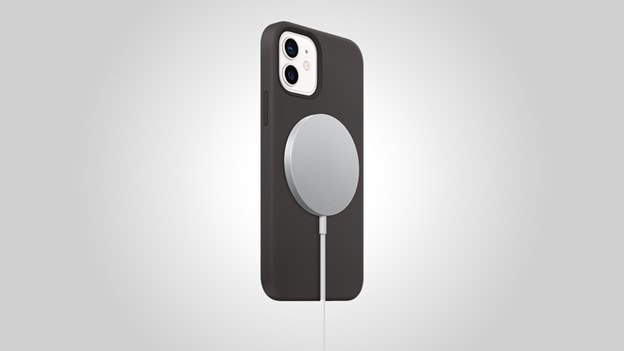
MagSafe is Apple’s exclusive charging system that utilizes magnets (“Mag”) for high-speed wireless charging. MagSafe technology was first designed for MacBook laptops and later adapted for other devices like iPhones and beyond.
### What is the purpose of MagSafe?
MagSafe is all about convenience. It helps your device snap perfectly into place for charging and lets you attach accessories, like wallets and battery packs, without fuss. No cables. No misalignment. Just click and go.
### What is the difference between MagSafe and regular wireless charging?
With regular wireless charging, you have to carefully place your phone on a charging pad, and if it's even a little off, it might not charge right. MagSafe fixes that by using magnets to pull everything into perfect alignment automatically, especially with Apple-approved gear. It also opens the door to an array of cool snap-on accessories.
### What are the pros and cons of MagSafe?
Since MagSafe chargers effortlessly and precisely fit to your compatible Apple devices using magnets, they ensure proper alignment for fast wireless charging, while also making connecting and disconnecting buttery smooth. Here are three key benefits of MagSafe technology:
1. __Fast, efficient wireless charging__ – perfect alignment ensures optimal power transfer
2. __Access to snap-on accessories__ – like wallets, stands, and power banks
3. __Strong, secure connection__ – your phone stays in place while it charges
While MagSafe undoubtedly comes with a variety of benefits, there are a couple potential drawbacks to the technology, including:
1. __The price__ of the accessories may be more expensive than standard accessories
2. __Not all third-party gear__ supports the fastest charging or perfect alignment
## __How does MagSafe work?__
MagSafe uses magnets built into the back of your iPhone (starting with iPhone 12 and up). Those magnets line up with accessories like chargers, wallets, or cases, so they snap on exactly where they should. That means better charging, fewer dropped phones, and a whole lineup of handy add-ons that keep you conveniently charged on-the-go.
### __MagSafe-compatible Apple accessories__
As we mentioned, while chargers were the first MagSafe products available, there are now a host of other innovative and stylish [MagSafe-friendly accessories](https://www.t-mobile.com/accessories/featured/magnetic) out there for iPhones and beyond.
__MagSafe-compatible accessories include:__
- MagSafe cases, wallets, and battery packs
- PopSockets PopWallet+ or PopGrip, and more
These accessories are designed to work in tandem with the MagSafe technology in your compatible device for effortless, fast, and precise charging.
### MagSafe accessories: Cases, chargers, wallets, battery packs, & PopSockets
| Product Type | MagSafe Benefit | Best Use Case | Certified by Apple (Y/N) |
|-------------------------------------|-----------------------------------------------------------------------------------------------------------|-----------------------------------------------------------------------------------------------|----------------------------|
| MagSafe Cases | Strong magnetic alignment; supports full-speed MagSafe charging and accessories | Everyday phone protection while using MagSafe chargers and add-ons | Both (Apple & third-party) |
| MagSafe Chargers | Fast, efficient magnetic wireless charging that auto-aligns with the iPhone | Quick daily charging without cables | Both (Apple & third-party) |
| Quick daily charging without cables | Secure magnetic attachment for carrying cards on the back of the phone | Minimizing pockets/bags; keeping essentials with your phone | Both (Apple & third-party) |
| MagSafe Battery Packs | Magnetic snap-on power source for wireless on-the-go charging; aligns automatically and charges instantly | Portable extra battery life without cables; quick top-ups while traveling or during long days | Both (Apple & third-party) |
| MagSafe PopSockets | Magnetic grip that attaches without adhesive; easily removable and repositionable | Better phone grip, selfies, one-hand use, and kickstand function | Third-party |
## __What is a MagSafe Case?__
A MagSafe case is a protective phone case built with magnets that let it lock cleanly onto MagSafe chargers and accessories. Whether it’s made by Apple or a third-party brand, the big benefit is effortless compatibility, since you can snap on chargers, wallets, stands, or battery packs without adjusting or removing the case.
Another perk is consistent charging performance: because the magnets are aligned, your phone charges at full speed. Plus, many cases add extra grip, drop protection, or premium materials, so you don’t have to trade style for functionality.
## __What is a MagSafe Wallet?__
A MagSafe wallet is a slim, magnet-backed card holder that attaches to the back of your iPhone or MagSafe case. Apple makes one, but plenty of other brands offer versions with more space, different textures, or lower prices.
The biggest benefit is convenient minimalism, since you can carry your essential cards right on your phone and leave your bulky wallet behind. It also keeps your pocket organized and reduces clutter. Many designs add helpful features like quick-access card slots, stronger magnetic hold, or built-in stands so the wallet can double as a kickstand.
## __What is a MagSafe PopSocket?__
A MagSafe PopSocket is a detachable grip and stand that snaps onto the back of your MagSafe-compatible phone or case. Whether it’s an official PopSocket brand or another magnetic grip, you get a more comfortable, secure grip for photos, texting, or one-handed use, and you can pop it off instantly when you want a flat phone, like when wirelessly charging. Many magnetic grips also work as adjustable stands, making it easier to watch videos or take hands-free calls anytime.
Before we wrap up, it's clear that MagSafe has grown far beyond a simple charging feature – it’s an entire ecosystem designed to make using your Apple devices more convenient, customizable, and efficient. Whether you're looking for faster wireless charging, a smarter way to carry your essentials, or accessories that snap on without a fuss, MagSafe offers a little something for everyone.
### What about non-Apple MagSafe-compatible accessories?
There are a lot of magnetic charging accessories that are not made by Apple, but should still work with Apple products. While most major brands are perfectly safe to use, keep in mind you may not get the fastest (up to 25W) charging that comes with an Apple-made or Apple-certified product. If that’s not an issue, there are plenty of stylish chargers and accessories to choose from that deliver both form and function so you can make the most of your Apple devices.
## __15 FAQs about MagSafe charging__
__1. What is the purpose of MagSafe?__
MagSafe makes attaching accessories and charging your iPhone easier and more reliable. Magnets ensure everything lines up perfectly, so you get better charging efficiency and a secure way to add things like wallets, stands, and grips.
__2. How does MagSafe charging work?__
MagSafe uses a ring of magnets around the wireless charging coil in your iPhone. When you place a MagSafe charger on the back, it snaps into the ideal charging position automatically, helping deliver fast, consistent wireless charging.
__3. Is a MagSafe case necessary?__
No. A MagSafe case improves magnetic strength and ensures full compatibility with chargers and accessories, but your iPhone will still work with [other types of cases](https://www.t-mobile.com/dialed-in/accessories/best-ipad-cases), or no case at all. A non-MagSafe case, however, can weaken the magnetic connection.
__4. Does MagSafe charge faster than Qi?__
Yes. MagSafe can deliver faster wireless charging speeds because the magnets align everything perfectly. Standard Qi chargers don’t have this alignment, so they’re usually slower.
__5. Can you use MagSafe without a case?__
Yes. The magnets are built into the phone itself. Using MagSafe directly on the phone actually gives the strongest magnetic hold. Just be aware there’s no protection if you drop it.
__6. What iPhones support MagSafe?__
MagSafe is supported on iPhone 12 and newer models. Each version has the magnetic ring built in for accessories and wireless charging.
__7. Can I use a regular case with MagSafe accessories?__
Regular cases *can* work, but results vary. Thick or non-magnetic cases weaken the connection or block chargers. For best performance, use a case designed specifically for MagSafe.
__8. What is a MagSafe wallet used for?__
A MagSafe wallet attaches to the back of your iPhone and lets you carry essentials like your ID, credit cards, or transit cards. It’s a simple way to travel lighter and keep everything in one place.
__9. Will a MagSafe wallet demagnetize my cards?__
No. MagSafe magnets aren’t strong enough to damage credit card strips or chips. They’re designed to be safe for everyday cards.
__10. What is a MagSafe PopSocket?__
A MagSafe PopSocket is a magnetic grip and stand that snaps onto the back of your iPhone. It gives you a more secure hold for photos and texting, and you can remove it instantly – no adhesive needed.
__11. Do you need a special charger for MagSafe?__
For true MagSafe speeds, yes. Use an Apple MagSafe Charger or an officially certified “Made for MagSafe” third-party option. Other wireless chargers may still work but charge slower.
__12. Is MagSafe safe for battery health?__
Yes. MagSafe follows the same smart charging protections as regular wireless charging. iPhone manages heat and power to protect battery lifespan.
__13. How secure is the magnetic connection?__
Secure enough for everyday use – charging, grips, wallets, stands – but not as strong as a mechanical latch. Accessories stay in place during normal activity but can pop off under sudden force.
__14. Are third-party MagSafe accessories reliable?__
Most reputable brands work very well. Some third-party items are “MagSafe compatible” (magnets only), while others are “Made for MagSafe” (Apple-certified). The latter typically give the best performance.
__15. What’s the difference between MagSafe and wireless charging?__
MagSafe *is* wireless charging, but enhanced with magnets for precise alignment. That alignment improves efficiency, reduces heat, and allows for secure accessories – things regular Qi chargers can’t offer.
##### You might also be interested in:
[How Does Wireless Charging Work?](https://www.t-mobile.com/dialed-in/accessories/how-does-wireless-charging-work)
[Apple MagSafe Accessories](https://www.t-mobile.com/commerce/accessories?Featured=MAGSAFE%20COMPATIBLE&Brands=Apple)
[Deals on MagSafe Accessories](https://www.t-mobile.com/accessories/deals/magsafe-compatible)
[How and Why to Upgrade Your iPhone](https://www.t-mobile.com/dialed-in/devices/upgrade-your-iphone)
[Apple Gifting Ideas: The Ultimate Guide for Apple Lovers](https://www.t-mobile.com/dialed-in/accessories/apple-gifts)
[From the First iPhone to Now](https://www.t-mobile.com/dialed-in/devices/evolution-of-iphone)
##### Sources:
[https://support.apple.com/en-us/118474](https://support.apple.com/en-us/118474)
[https://appleinsider.com/articles/21/01/08/dont-let-third-parties-confuse-you-about-apples-magsafe](https://appleinsider.com/articles/21/01/08/dont-let-third-parties-confuse-you-about-apples-magsafe)
[https://www.belkin.com/clp-what-is-magsafe.html](https://www.belkin.com/clp-what-is-magsafe.html)
[https://www.anker.com/blogs/wireless-chargers/does-magsafe-charge-faster](https://www.anker.com/blogs/wireless-chargers/does-magsafe-charge-faster)
[https://www.moft.us/blogs/news/which-iphones-have-magsafe](https://www.moft.us/blogs/news/which-iphones-have-magsafe)
[https://zens.tech/pages/phones-with-wireless-charging-technology](https://zens.tech/pages/phones-with-wireless-charging-technology)
[https://www.anker.com/blogs/power-banks/is-magsafe-bad-for-battery](https://www.anker.com/blogs/power-banks/is-magsafe-bad-for-battery)
Tags
- [Apple](https://www.t-mobile.com/dialed-in/archive/apple)
- [Device Case](https://www.t-mobile.com/dialed-in/archive/device-case)
- [MagSafe Accessories](https://www.t-mobile.com/dialed-in/archive/magsafe-accessories)
- [Phone](https://www.t-mobile.com/dialed-in/archive/phone)
- [Wireless Charging](https://www.t-mobile.com/dialed-in/archive/wireless-charging)
## Related Articles
NEW
[Read More](https://www.t-mobile.com/dialed-in/accessories/back-to-school-deals)
[](https://www.t-mobile.com/dialed-in/accessories/back-to-school-deals)
[Accessories](https://www.t-mobile.com/dialed-in/category/accessories)
## [12 Back to School Gifts Students Will Actually Use](https://www.t-mobile.com/dialed-in/accessories/back-to-school-deals)
August 4, 2026
NEW
[Read More](https://www.t-mobile.com/dialed-in/accessories/what-is-a-smart-ring)
[](https://www.t-mobile.com/dialed-in/accessories/what-is-a-smart-ring)
[Accessories](https://www.t-mobile.com/dialed-in/category/accessories)
## [What is a Smart Ring? How They Work, Features & More](https://www.t-mobile.com/dialed-in/accessories/what-is-a-smart-ring)
October 6, 2026
NEW
[Read More](https://www.t-mobile.com/dialed-in/accessories/best-apple-headphones-for-you)
[](https://www.t-mobile.com/dialed-in/accessories/best-apple-headphones-for-you)
[Accessories](https://www.t-mobile.com/dialed-in/category/accessories)
## [Which Apple AirPods are Right for You? A 2026 Comparison](https://www.t-mobile.com/dialed-in/accessories/best-apple-headphones-for-you)
September 18, 2026
### Get Connected with T-Mobile! Shop Now for your ideal phone.
[Shop now](https://www.t-mobile.com/cell-phones)
## Follow T-Mobile
- [](https://www.instagram.com/tmobile/)
- [](https://www.facebook.com/TMobile)
- [](https://twitter.com/TMobile)
- [](https://www.youtube.com/user/TMobile/custom)
[English](https://t-mobile.com)[Español](https://es.t-mobile.com)
Even more plans
Even more plans
- [Senior phone plans](https://www.t-mobile.com/cell-phone-plans/unlimited-55-senior-discount-plans)
- [International phone plans](https://www.t-mobile.com/cell-phone-plans/international-roaming-plans)
- [International passes](https://www.t-mobile.com/cell-phone-plans/international-roaming-plans/unlimited-calling-data-pass)
- [Home Internet plans](https://www.t-mobile.com/home-internet/plans)
- [Phone and internet bundles](https://www.t-mobile.com/cell-phone-plans/phone-home-internet-bundle)
- [Hotspot plans](https://www.t-mobile.com/cell-phone-plans/affordable-data-plans/hotspots)
- [Business phone plans](https://www.t-mobile.com/business/wireless-business-plans)
Shop devices by brand
Shop devices by brand
- [iPhones](https://www.t-mobile.com/cell-phones/brand/apple)
- [iPads](https://www.t-mobile.com/tablets/brand/apple)
- [Apple Watches](https://www.t-mobile.com/smart-watches/brand/apple)
- [Galaxy phones](https://www.t-mobile.com/cell-phones/brand/samsung)
- [Samsung tablets](https://www.t-mobile.com/tablets/brand/samsung)
- [Samsung watches](https://www.t-mobile.com/smart-watches/brand/samsung)
- [Motorola phones](https://www.t-mobile.com/cell-phones/brand/motorola)
- [Google Pixel phones](https://www.t-mobile.com/cell-phones/brand/google)
New featured cell phones
New featured cell phones
- [New Apple iPhone Duo](https://www.t-mobile.com/cell-phone/apple-iphone-duo)
- [New Apple iPhone 18 Pro](https://www.t-mobile.com/cell-phone/apple-iphone-18-pro)
- [New Apple iPhone 18 Pro Max](https://www.t-mobile.com/cell-phone/apple-iphone-18-pro-max)
- [New Samsung Galaxy Z Fold8](https://www.t-mobile.com/cell-phone/samsung-galaxy-z-fold8)
- [New Google Pixel 11](https://www.t-mobile.com/cell-phone/google-pixel-11)
New featured tablets, smartwatches & more
New featured tablets, smartwatches & more
- [Apple iPad Mini (A17 Pro)](https://www.t-mobile.com/tablet/apple-ipad-mini-a17-pro)
- [Apple iPad (A16)](https://www.t-mobile.com/tablet/apple-ipad-a16)
- [Apple Watch SE 3 40mm](https://www.t-mobile.com/smart-watch/apple-watch-se-3-40mm)
- [T-Mobile Revvl Tab 2](https://www.t-mobile.com/tablet/t-mobile-revvl-tab-2)
- [Samsung Galaxy Tab A11+ 5G](https://www.t-mobile.com/tablet/samsung-galaxy-tab-a11-plus-5g)
- [Samsung Galaxy Watch Ultra2](https://www.t-mobile.com/smart-watch/samsung-galaxy-watch-ultra2)
Helpful consumer guides
Helpful consumer guides
- [Dialed In](https://www.t-mobile.com/dialed-in)
- [Cell Phone BYOD Guide](https://www.t-mobile.com/dialed-in/devices/what-is-byod-bring-your-own-device)
- [The 6 Best Samsung Phones of 2026](https://www.t-mobile.com/dialed-in/devices/best-samsung-phones)
- [iPhone 18 Series: Specs, Price and Release Dates](https://www.t-mobile.com/dialed-in/devices/iphone-18-series-specs-features)
- [How Does Satellite Phone Service Work?](https://www.t-mobile.com/dialed-in/wireless/how-satellite-phone-service-works)
T-Mobile customer benefits
T-Mobile customer benefits
- [TV streaming deals](https://www.t-mobile.com/tv-streaming)
- [T-Mobile Tuesdays](https://www.t-mobile.com/offers/t-mobile-tuesdays)
- [In-flight wi-fi](https://www.t-mobile.com/benefits/travel/in-flight-wifi)
- [Refer-a-Friend](https://referral.t-mobile.com/)
- [Device protection plan](https://www.t-mobile.com/benefits/phone-protection-plans)
- [Protection 360® HomeTech](https://www.t-mobile.com/benefits/phone-protection-plans/p360-home-tech)
Switch to T-Mobile
Switch to T-Mobile
- [How to switch to T-Mobile](https://www.t-mobile.com/resources/how-to-join-us)
- [Try our 5G network](https://www.t-mobile.com/offers/free-trial)
- [Bring your own device](https://www.t-mobile.com/resources/bring-your-own-phone)
- [Switch to T-Mobile from Verizon or AT&T](https://www.t-mobile.com/switch/keep-phone-switch-from-verizon-or-att)
- [Family freedom deal](https://www.t-mobile.com/switch/pay-off-carrier-etf-phone-deal)
- [Cell phone trade-in](https://www.t-mobile.com/devices/phone-trade-in)
Additional support
Additional support
- [View return policy](https://www.t-mobile.com/responsibility/legal/return-policy)
- [Contact us](https://www.t-mobile.com/contact-us)
- [Billing](https://www.t-mobile.com/support/account/whats-impacting-your-bill)
- [Shipping & pickup options](https://www.t-mobile.com/customers/shipping-dates)
- [Free Internet for Students](https://www.t-mobile.com/brand/project-10-million)
- [Redeem a rebate](https://promotions.t-mobile.com/)
- [Domestic Violence Resources](https://www.t-mobile.com/support/account/keeping-customers-safe-connected)
About T-Mobile
About T-Mobile
- [Our Story](https://www.t-mobile.com/our-story)
- [T-Mobile careers](https://careers.t-mobile.com/)
- [Privacy Center](https://www.t-mobile.com/privacy-center)
- [Newsroom](https://www.t-mobile.com/news)
- [Corporate Responsibility](https://www.t-mobile.com/responsibility)
[](https://www.t-mobile.com)
- [About](https://www.t-mobile.com/our-story)
- [Investor relations](https://investor.t-mobile.com/default.aspx)
- [Press](https://www.t-mobile.com/news)
- [Careers](https://careers.t-mobile.com)
- [Deutsche Telekom](https://www.telekom.com/en)
- [Puerto Rico](https://www.t-mobilepr.com/)
- [Privacy Notice](https://www.t-mobile.com/privacy-center/privacy-notices/t-mobile-privacy-notice)
- [Trust Center](https://security.t-mobile.com/)
- [Privacy Center](https://www.t-mobile.com/privacy-center)
- [Consumer information](https://www.t-mobile.com/responsibility/consumer-info)
- [Public safety/911](https://www.t-mobile.com/responsibility/consumer-info/safety/9-1-1)
- [Terms & conditions](https://www.t-mobile.com/responsibility/legal/terms-and-conditions)
- [Terms of use](https://www.t-mobile.com/responsibility/consumer-info/policies/terms-of-use)
- [Accessibility](https://www.t-mobile.com/responsibility/consumer-info/accessibility-policy)
- [Open Internet](https://www.t-mobile.com/responsibility/consumer-info/policies/internet-service)
- [Do Not Sell or Share My Personal Information](javascript:void%280%29)
- [Licenses & Patents](https://www.t-mobile.com/responsibility/legal/licenses-and-patents)
- [Consumer Health Data Privacy Notice](https://www.t-mobile.com/privacy-center/privacy-notices/t-mobile-privacy-notice.html#health-data-privacy-notice)
- [T-Mobile, the T logo, Magenta and the magenta color are registered trademarks of Deutsche Telekom AG.](https://www.t-mobile.com)
- [](https://www.instagram.com/tmobile/)
- [](https://www.facebook.com/TMobile)
- [](https://twitter.com/TMobile)
- [](https://www.youtube.com/user/TMobile/custom)
© 2026 T‑Mobile USA, Inc.
Top