[Skip to main content](https://www.t-mobile.com#content-main)
Screen share in progress. End session.
All information on this page is hidden from your Expert.
All personal information on this page is hidden from your Expert.
[](https://www.t-mobile.com/home-internet)
Log in
[](https://www.t-mobile.com/home-internet)
Search
Search Submit search query Close out of search
RECENT SEARCH0 recent searches
POPULAR0 popular search suggestions
Categoriesundefined categories
Suggestions0 search suggestions
TOP SUGGESTIONS
- [](https://www.t-mobile.com)
undefined top suggestions
- [Plans](https://www.t-mobile.com/home-internet/plans) Plans
- [Home Internet plans](https://www.t-mobile.com/home-internet/plans)
- [Home Internet ALL-IN plan](https://www.t-mobile.com/home-internet/plans/all-in-unlimited-internet-plan)
- [55+ Phone & Internet Bundle](https://www.t-mobile.com/home-internet/deals/phone-internet-bundles-for-seniors)
- [Home Internet AWAY plan](https://www.t-mobile.com/home-internet/plans/rv-camper-internet-plans)
- [Home Internet Backup plan](https://www.t-mobile.com/home-internet/plans/5g-backup-internet-options)
- [Business Internet plan](https://www.t-mobile.com/business/solutions/business-internet-services/small-business-internet)
- [Prepaid Internet plan](https://www.metrobyt-mobile.com/home-internet-plans.html?INTNAV=tNav%3APlans%3APrepaidInternetPlan)
- [Fiber Internet](https://www.t-mobile.com/home-internet/fiber)
- [Internet Speed & Technology](https://www.t-mobile.com/home-internet/how-5g-home-internet-works) Internet Speed & Technology
- [Internet Speed & Technology](https://www.t-mobile.com/home-internet/how-5g-home-internet-works)
- [Internet deals](https://www.t-mobile.com/home-internet/deals) Internet deals
- [Internet deals](https://www.t-mobile.com/home-internet/deals)
- [Phone & internet bundles](https://www.t-mobile.com/cell-phone-plans/phone-home-internet-bundle)
- [Same Day Delivery](https://www.t-mobile.com/home-internet/doordash-same-day-internet)
- [Moving](https://www.t-mobile.com/home-internet/transfer-internet-service)
- [Support](https://www.t-mobile.com/support/home-internet) Support
- [Getting started](https://www.t-mobile.com/support/home-internet)
- [WiFi Gateway device](https://www.t-mobile.com/support/home-internet/t-mobile-gateway)
- [Internet app](https://www.t-mobile.com/support/home-internet/app)
- [Test Drive Worry-Free Trial](https://www.t-mobile.com/support/home-internet/15-day-test-drive)
- [Home Internet FAQ](https://www.t-mobile.com/home-internet/faq)
- [Internet Troubleshooting](https://www.t-mobile.com/support/home-internet/customer-support)
[Contact](https://www.t-mobile.com/support/home-internet/contact-us) Contact
- [Sales: 1-844-839-5057](tel:1-844-839-5057)
- [Support: 1-844-275-9310](tel:1-844-275-9311)
- [Check order status](https://www.t-mobile.com/orders/order-status)
- Screen share with an Expert
Search
Search Submit search query Close out of search
RECENT SEARCH0 recent searches
POPULAR0 popular search suggestions
Categoriesundefined categories
Suggestions0 search suggestions
TOP SUGGESTIONS
- [](https://www.t-mobile.com)
undefined top suggestions
[Check availability](https://www.t-mobile.com/home-internet/eligibility)
My account
[Log in](https://www.t-mobile.com/signin?state=https%3A%2F%2Fwww.t-mobile.com%2Fhome-internet%2Fplans) [Back to my account](https://www.t-mobile.com/account/dashboard)
For Home Internet customers only
- [Sign up for T-Mobile ID](https://www.t-mobile.com/home-internet-signup)
- [Wireless](https://www.t-mobile.com/)
- [Business](https://www.t-mobile.com/business)
- [Prepaid](https://prepaid.t-mobile.com/home)
- [Internet](https://www.t-mobile.com/home-internet)
[](https://www.t-mobile.com)
# T-Mobile 5G Gateway (G4AR & G4SE)
Find technical details, tutorial links, and other information about your T-Mobile 5G Gateway.
- [About the Gateway](https://www.t-mobile.com#about)
- [LCD Screen](https://www.t-mobile.com#lcd)
- [Tech Specs](https://www.t-mobile.com#tech-specs)
- [Firmware Updates](https://www.t-mobile.com#firmware)
- [External Antenna](https://www.t-mobile.com#antenna)
## About the Gateway
For more gateway steps, such as instructions on how to install your SIM or reset your gateway, check out our Tutorials.
[Tutorials , opens in a new window](https://www.t-mobile.com/support/tutorials/device/t-mobile/5g-gateway-g4ar-amp-g4se)
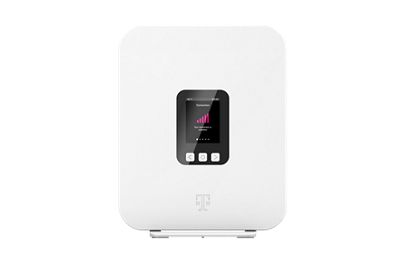
Front View

### Reading the gateway label
The label on the back of your gateway includes information about the device and network including the __default Wi-Fi network name and Wi-Fi password__.
[Learn more about setting up your gateway , opens in a new window](https://www.t-mobile.com/support/home-internet/t-mobile-gateway)

## LCD Screen
Press the left or right arrow ( < or > ) on the LCD panel with your finger to move between screens. The illuminated dot on the bottom of the screen indicates where you are in the screen sequence.
- ### Connection
- The gateway displays up to five bars, indicating signal strength.
- The number of bars represents the strength of the gateway's current connection to the cellular network.
- An 'X' indicates the gateway is not connected to the cellular network.
- ### Devices
- The number displayed indicates the number of devices currently connected to the gateway (including wireless and wired devices).
- Use the [T-Life app](https://www.t-mobile.com/support/home-internet/app "Learn more about the T-Mobile Internet app") to see and manage each connected device.
- ### Internet Line Number
The Internet Line Number screen displays your internet number when the SIM card is installed.
- ### Messages
The Messages screen allows you to view the message contents by using the left and right arrows to scroll between messages.
To delete a message:
1. Press __O__ (OK) on the panel to select __VIEW MESSAGES__ and view unread messages.
2. Select __NEXT__ and read next message.
3. Select __DONE__ when you have read all messages.
4. Select __DELETE__ to delete a message.
5. When prompted with a message asking you to confirm deletion, select __YES__ to confirm.
You can block messages to your gateway through your T-Mobile account. See [Message Blocking](https://www.t-mobile.com/support/plans-features/message-blocking) for details.
- ### Language Settings
The gateway supports both English and Spanish on the LCD screen. To adjust this setting:
1. From the __Languages__ screen, select __CHANGE__.
2. Select __English__ or __Español__.
3. Press __O__ (OK) button to set the language.
- ### Antenna Settings
The gateway already has an internal embedded antenna, but an optional external antenna can be connected if you can't set up the gateway in the ideal location. To switch to the external antenna:
1. From the Antenna screen, select __CHANGE__.
2. Choose __INTERNAL__ to use the embedded antenna or __EXTERNAL__ to use an external attached antenna.
3. Select __OK__ to confirm.
## Tech Specs
- Dimensions (W x H)
- 228 (H) x 180 (W) x 76 (D) mm
- Weight
- 880 g
- 1.94 lbs
- Operating environment
- 0° – 40° C (32° F – 104° F)
- IoT / GPS
- Bluetooth 5.1
- GPS
- Power adapter
- AC
- Power input
- 100 - 240V, 3A @ DC 15V, 50/60Hz
- Theoretical power consumption
- 45 W
- Wi-Fi connectivity
- 11ax 4x4 2.4G
- 11ax 4x4 5G
- Seamless roaming
- Security
- WPA/WPA2/WPA3
- Buttons
- Reset (recessed switch)
- Arrow Keys (left/right)
- Enter (OK)
- Display
- TFT LCD Non-Touch Panel
- 2.4-Inch
- 240x320 Resolution
- Mobile Band
- 5G NR: n25, n41, n48, n66, n71, n77 (DoD and C-Band)
- 4G LTE: B2, B4, B5, B12, B25, B48, B66, B71
- Physical Interfaces
- GE LAN (Yellow)
- SIM Card Socket (4FF Only)
- USB Type C x 1 (Regular Power Source)
- USB Type C x 1 (Data and other USB Port Purpose)
- External Antenna Connectors (external T-Mobile 5G Antenna attachment port)
## Firmware Updates
- Firmware updates are pushed out automatically when available. They can't be manually requested.
- They're sent out in phases over a few weeks, so not all users get the update at the same time.
- Updates happen between 1 am and 3 am PST; make sure your gateway is turned on during this time to get the update.
- Do not restart the gateway when it’s updating. The gateway will automatically restart once the update is complete.
### __Firmware versions, fixes, and features - G4AR__
- __1.00.16:__ Stability improvements
- __1.00.13:__ Minor bug fixes, 5G standalone (SA) enablement, & Stability improvements
- __1.00.12:__ Stability improvements
- __1.00.09:__ Updates to LCD user interface & Stability improvements
- __1.00.02:__ Stability improvements
- __1.00.01:__ Release version
__Firmware versions, fixes, and features - G4SE__
- __1.03.28:__ Stability improvements
- __1.03.20:__ Stability improvements
- __1.03.19:__ Stability improvements
- __1.03.14:__ Stability improvements & Security enhancements
- __1.02.13:__ Stability improvements
- __1.02.09:__ Release version
## External Antenna
The T-Mobile 5G Antenna is an external antenna that can be attached to your T-Mobile 5G Gateway (G4AR or G4SE). It will allow you to position your T-Mobile 5G Gateway (G4AR or G4SE) in the most desired and convenient location in your home. For example, if you’re unable to place your gateway in an ideal location according to the T-Life App, like in a window or high up on an upper floor or shelf, the 5G Antenna can be placed in the window while connected to the T-Mobile 5G Gateway (G4AR or G4SE).
- ### Order Support
The T-Mobile 5G Antenna is an optional antenna attachment available only for the T-Mobile 5G Gateway (G4AR or G4SE), and is only necessary if you are experiencing poor signal due to limited placement options. The T-Mobile 5G Antenna is available for purchase on t-mobile.com as an accessory-only order, and is not available for purchase in Retail, Care, or Virtual Retail.
Ready to purchase an External Antenna for your T-Mobile 5G Gateway? [Shop now >](https://www.t-mobile.com/accessory/t-mobile-internet-5g-antenna?sku=610214679338 "Shop for T-Mobile Gateway antenna")[](https://www.t-mobile.com/accessory/t-mobile-internet-5g-antenna?sku=610214679338 "shop for T-Mobile gateway antenna")
- ### Setup
1. Attach the 4 suction cups to the back of the antenna mounting bracket by inserting the rubber tip of each suction cup through each slot and locking them into place.
2. Using the provided wrench, connect the antenna cables to the base of the T-Mobile 5G Gateway (G4AR or G4SE), matching the numbers on the corresponding ports and cables (be careful not to tighten the cables too much, as the connector could get damaged).
3. Place the antenna on desired window, ideally on an upper floor, by pressing firmly on the suction cups (for best results, make sure the window surface is clean before mounting).
4. On the T-Mobile 5G Gateway, navigate to the __Antenna__ screen and switch from __Internal Antenna__ to __External Antenna__ (if you disconnect the antenna from the gateway, you will need to change this setting back to __Internal Antenna__).
- ### Tech Specs
- Network:
- 5G 4x4 MIMO
- 5G Bands: N25, N41, N48, N66, N71, N77
- Dimensions: 5.91 x 5.35 x .78 in (150 x 136 x 20mm)
- Weight: 1.3 lbs
- Cable:
- 4 x 2-meter (6.5 ft) cables
- SMA Connectors
- Temperature Range: -40°C - 85°C (-49°F - 185°F)
- ### Troubleshooting
If the gateway loses signal when the antenna is attached:
1. The T-Mobile 5G Antenna is only compatible with the T-Mobile 5G Gateway (G4AR or G4SE). Make sure you are only connecting the antenna to a compatible gateway.
2. Make sure the cables are fully screwed into the correct ports. (hand tighten to prevent over tightening.)
3. Change the antenna settings on the gateway LCD from __Internal Antenna__ to __External Antenna__ (if you have unplugged the External Antenna, you will need to change this setting back to __Internal Antenna__)
4. Check placement of the antenna. The antenna is for indoor use only and the back of the antenna (where the window mount bracket is) should face the nearest tower.
5. If the gateway loses signal or the signal degrades while the antenna is attached and the steps above have been completed, exchange the antenna.


## Need help?
Our Troubleshooting guides can help fix the most common T-Mobile Internet issues, right from the comfort of your home!
[T-Mobile Internet Troubleshooting , opens in a new window](https://www.t-mobile.com/support/home-internet/customer-support)
## Need help?
## Looking for something else?
[Return to T-Mobile Internet Support , opens in a new window](https://www.t-mobile.com/support/home-internet)
__Was this helpful?__
Survey Link
## Hello! Want to stay logged in?
To keep your accounts safe, you'll be automatically logged out in:
Yes, stay logged in
No, log me out
## Share your screen with an Expert
__Get guided support over the phone or while shopping in-store__
- For your security, personal info, tabs, and notifications are automatically hidden.
- You can stop screen sharing at any time.
- Experts can only see what’s on T-Mobile.com.
- Don’t use screen share while driving or in any situation where it's unsafe to focus on your screen.
By clicking 'Accept and continue,' you are consenting to allow the Expert to view your screen for assisted navigation. This session may be recorded. To learn more, please visit the
[__T-Mobile Privacy Notice__](https://www.t-mobile.com/privacy-center/privacy-notices/t-mobile-privacy-notice).
Accept and continue
No thanks
__Next:__ Generate a code to share with your Expert
## Share this code with your Expert
code
Once your code has been successfully entered by your Expert, this window will close and continue to the session.
## Allow screen sharing with your Expert?
Personal and sensitive data is hidden for your security and privacy.
Allow
Don’t allow
## End your session?
Ending your session will stop sharing your screen, but will not end your call.
End session
Continue session
## Your session has ended
Your screen is no longer being shared with your Expert.
OK
Share again
## You are already in an active session
OK
## Your code has expired
Generate a new one to share with your Expert.
Generate new code
## Connect with T-Mobile Home Internet
- [Instagram](https://www.instagram.com/tmobile/)
- [Facebook](https://www.facebook.com/TMobile)
- [X](https://twitter.com/TMobile)
- [You Tube](https://www.youtube.com/user/TMobile/custom)
- [English](https://www.t-mobile.com)
- [Español](https://www.t-mobile.com)
- ### Support
Support
- [Home Internet FAQ](https://www.t-mobile.com/home-internet/faq)
- [Setup Wi-Fi Gateway](https://www.t-mobile.com/home-internet/gateway)
- [Emergency Broadband Benefit](https://www.t-mobile.com/customers/emergency-broadband-benefit)
- ### Get the app
Get the app
- [T-Life App](https://www.t-mobile.com/home-internet/app)
- ### Consumer guides
Consumer guides
- [The Signal](https://www.t-mobile.com/home-internet/the-signal)
- [Fiber Internet Explained](https://www.t-mobile.com/home-internet/the-signal/isp/what-is-fiber-internet)
- [What is Wi-Fi 7](https://www.t-mobile.com/home-internet/the-signal/internet-help/what-is-wifi-7)
- [What Internet Speed Do I Need?](https://www.t-mobile.com/home-internet/the-signal/speed/what-internet-speed-do-i-need)
[](https://www.t-mobile.com/)
- [About](https://www.t-mobile.com/our-story)
- [Investor relations](https://investor.t-mobile.com/default.aspx?INTNAV=fNav%3AInvestorRelations)
- [Press](https://www.t-mobile.com/news)
- [Careers](https://careers.t-mobile.com?INTNAV=fNav%3ACareers)
- [Deutsche Telekom](https://www.telekom.com/en?INTNAV=fNav%3ADeutscheTelekom)
- [Puerto Rico](https://www.t-mobilepr.com/?INTNAV=fNav%3APuertoRico)
- [Privacy Notice](https://www.t-mobile.com/privacy-center/privacy-notices/t-mobile-privacy-notice)
- [Trust Center](https://security.t-mobile.com/?INTNAV=fNav%3ATrustCenter)
- [Privacy Center](https://www.t-mobile.com/privacy-center)
- [Consumer information](https://www.t-mobile.com/responsibility/consumer-info)
- [Public safety/911](https://www.t-mobile.com/responsibility/consumer-info/safety/9-1-1)
- [Terms & conditions](https://www.t-mobile.com/responsibility/legal/terms-and-conditions)
- [Terms of use](https://www.t-mobile.com/responsibility/consumer-info/policies/terms-of-use)
- [Accessibility](https://www.t-mobile.com/responsibility/consumer-info/accessibility-policy)
- [Open Internet](https://www.t-mobile.com/responsibility/consumer-info/policies/internet-service)
- [Do Not Sell or Share My Personal Information](https://www.t-mobile.com)
- [Licenses & Patents](https://www.t-mobile.com/responsibility/legal/licenses-and-patents)
- [Consumer Health Data Privacy Notice](https://www.t-mobile.com/privacy-center/privacy-notices/t-mobile-privacy-notice.html?INTNAV=fNav%3AConsumerHealthDataPrivacyNotice#health-data-privacy-notice)
- T-Mobile, the T logo, Magenta and the magenta color are registered trademarks of Deutsche Telekom AG.
- [Instagram](https://www.instagram.com/tmobile/)
- [Facebook](https://www.facebook.com/TMobile)
- [X](https://twitter.com/TMobile)
- [You Tube](https://www.youtube.com/user/TMobile/custom)
© 2026 T‑Mobile USA, Inc.

## Stay up to date with notifications
Get the latest from T-Mobile when you’re using the web. You can opt out any time.
Allow notifications Don't allow

## Get the latest from T-Mobile
Stay up to date with notifications - including offers just for you
Allow notifications Don't allow notifications
## Need help?

## Stay up to date with notifications
Get the latest from T-Mobile when you’re using the web. You can opt out any time.
Allow notifications Don't allow

## Get the latest from T-Mobile
Stay up to date with notifications - including offers just for you
Allow notifications Don't allow notifications