[Skip to content](https://www.t-mobile.com/dialed-in/tips-tricks/5g-tower-locations#maincontent)

Hey, looks like you need help finding something. I am here to chat if you have any questions
Skip to main content Skip to footer
[Wireless](https://www.t-mobile.com/)
[Business](https://www.t-mobile.com/business)
[Prepaid](https://prepaid.t-mobile.com/home)
[Internet](https://www.t-mobile.com/home-internet)
[CARDS](https://www.t-mobile.com/cards/visa-credit-rewards)
[](https://www.t-mobile.com)
Log in
[Plans](https://www.t-mobile.com/cell-phone-plans)
[Unlimited Phone Plans](https://www.t-mobile.com/cell-phone-plans)[Unlimited Age 55+](https://www.t-mobile.com/cell-phone-plans/unlimited-55-senior-discount-plans)[Military & Veterans](https://www.t-mobile.com/cell-phone-plans/military-discount-plans)[First Responder](https://www.t-mobile.com/cell-phone-plans/first-responder-discounts)[Home Internet plans](https://www.t-mobile.com/home-internet/plans)[Watch & Tablet Plans](https://www.t-mobile.com/cell-phone-plans/affordable-data-plans)[Prepaid Phone Plans](https://prepaid.t-mobile.com/prepaid-plans)[Business Phone Plans](https://www.t-mobile.com/business/wireless-business-plans)
[Phones & devices](https://www.t-mobile.com/cell-phones)
[Cell phones](https://www.t-mobile.com/cell-phones)[5G phones](https://www.t-mobile.com/5g/phones)[Tablets](https://www.t-mobile.com/tablets)[Smartwatches](https://www.t-mobile.com/smart-watches)[Hotspots & more](https://www.t-mobile.com/hotspots-iot-connected-devices)[Accessories](https://www.t-mobile.com/accessories)[Bring your own device](https://www.t-mobile.com/commerce/bring-your-own-phone)[Holiday Tech Gift Ideas 2025](https://www.t-mobile.com/devices/tech-gifts)[Tech Gift Ideas](https://www.t-mobile.com/devices/tech-gifts)
[Deals](https://www.t-mobile.com/offers)
[See all deals](https://www.t-mobile.com/offers)[Apple](https://www.t-mobile.com/offers/apple-iphone-deals)[Samsung](https://www.t-mobile.com/offers/samsung-phone-deals)[Motorola](https://www.t-mobile.com/offers/motorola-phone-deals)[Google](https://www.t-mobile.com/offers/google-phone-deals)[Revvl](https://www.t-mobile.com/offers/t-mobile-revvl-phone-deals)
[Coverage](https://www.t-mobile.com/coverage/network)
[Our network](https://www.t-mobile.com/coverage/network)[4G & 5G Coverage map](https://www.t-mobile.com/coverage/coverage-map)[What is 5G](https://www.t-mobile.com/5g)[Satellite Phone Service](https://www.t-mobile.com/coverage/satellite-phone-service)[Rural & Small Towns](https://www.t-mobile.com/coverage/small-towns-rural-areas)[Try our network](https://www.t-mobile.com/offers/free-trial)[5G news](https://www.t-mobile.com/news/category/network)[Home Internet](https://www.t-mobile.com/home-internet/eligibility)
[Join Us](https://www.t-mobile.com/resources/how-to-join-us)
[What makes us different](https://www.t-mobile.com/brand/why-t-mobile)[Benefits](https://www.t-mobile.com/brand/benefits)[Block scam calls](https://www.t-mobile.com/customers/scam-shield)[Travel](https://www.t-mobile.com/benefits/travel)[How to switch](https://www.t-mobile.com/resources/how-to-join-us)[Tech Gift Ideas 2024](https://www.t-mobile.com/devices/tech-gifts)
[Find a store](https://www.t-mobile.com/stores/locator)
[Contact & support](https://www.t-mobile.com/contact-us)
[](https://www.t-mobile.com)[1-800-T-MOBILE](tel:1-800-866-2453)[Check order status](https://www.t-mobile.com/orders/check-order)[Help & support](https://www.t-mobile.com/support)[](https://www.t-mobile.com)
[Cart](https://www.t-mobile.com/cart)
Search
- POPULAR
[Search](javascript:void%280%29)
My account
more from T-Mobile
- [Wireless](https://www.t-mobile.com/)
- [Business](https://www.t-mobile.com/business)
- [Prepaid](https://prepaid.t-mobile.com/home)
- [Internet](https://www.t-mobile.com/home-internet)
- [CARDS](https://www.t-mobile.com/cards/visa-credit-rewards)
Legal
- [Privacy Policy](https://www.t-mobile.com/privacy-center/our-practices/privacy-policy)
- [Do Not Sell My Personal Information](javascript:void%280%29)
- [Privacy Center](https://www.t-mobile.com/privacy-center)
[Log in](https://www.t-mobile.com)
[Bill pay](https://www.t-mobile.com/signin?state=eyJpbnRlbnQiOiJQYXltZW50IiwiYm9va21hcmtVcmwiOiJodHRwczovL215LnQtbW9iaWxlLmNvbS9vbmV0aW1lcGF5bWVudCJ9) [Add a line](https://www.t-mobile.com/commerce/device-intent) [Upgrade](https://www.t-mobile.com/purchase/shop) [Check order status](https://www.t-mobile.com/orders/check-order) [Ask the Community](https://www.t-mobile.com/community)
[Dialed In](https://www.t-mobile.com/dialed-in)
- [Devices](https://www.t-mobile.com/dialed-in/category/devices)
- [Accessories](https://www.t-mobile.com/dialed-in/category/accessories)
- [Tips & Tricks](https://www.t-mobile.com/dialed-in/category/tips-tricks)
- [Wireless 101](https://www.t-mobile.com/dialed-in/category/wireless)
- [All Blogs](https://www.t-mobile.com/dialed-in/latest)
- [Newsroom](https://www.t-mobile.com/news)
- [Devices](https://www.t-mobile.com/dialed-in/category/devices)
- [Accessories](https://www.t-mobile.com/dialed-in/category/accessories)
- [Tips & Tricks](https://www.t-mobile.com/dialed-in/category/tips-tricks)
- [Wireless 101](https://www.t-mobile.com/dialed-in/category/wireless)
- [All Blogs](https://www.t-mobile.com/dialed-in/latest)
- [Newsroom](https://www.t-mobile.com/news)
1. [Dialed In](https://www.t-mobile.com/dialed-in)
2. Category:[Tips & Tricks](https://www.t-mobile.com/dialed-in/category/tips-tricks)
[Tips & TricksCategory](https://www.t-mobile.com/dialed-in/category/tips-tricks)
# Cell Tower Locations: How to Find 4G LTE and 5G Towers
Updated: March 19, 2026
|10 min read
When it comes to staying connected, cell tower locations matter. We’ll show you how to find the ones closest to you.
Curious to explore this topic with AI? Try it out with [ChatGPT](https://chatgpt.com/) or [Perplexity](https://www.perplexity.ai/search/new?q=Fact-check%20and%20expand%20on%20https%3A%2F%2Fwww.t-mobile.com%2Fdialed-in%2Ftips-tricks%2F5g-tower-locations).
- Share "Cell Tower Locations: How to Find 4G LTE and 5G Towers" on X
- Share "Cell Tower Locations: How to Find 4G LTE and 5G Towers" on Facebook
- Share "Cell Tower Locations: How to Find 4G LTE and 5G Towers" on LinkedIn
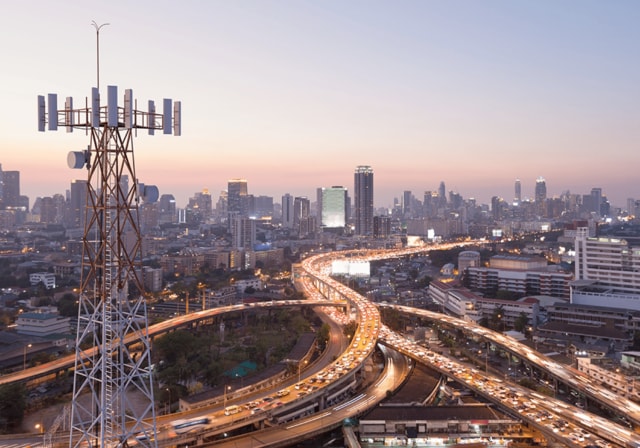
When it comes to staying connected, knowing where cell phone towers are located matters. Whether you're trying to find nearby 4G LTE or 5G towers, troubleshoot poor wireless coverage, or improve your connectivity at home or on the road, we'll show you how to find the cell tower locations closest to you and what to do with that information.
Ever spotted those metal towers when driving around and wondered what they’re for? Maybe you saw one trying to disguise itself in a “palm tree” or “cactus”. Or a new space-age-looking one just popped up near your neighborhood.
Chances are, they’re there to improve your network connectivity. Discover why cell tower locations are important, how to find the ones closest to you, and tips for staying seamlessly connected.
## __Why cell tower locations matter__
If you’ve ever been lost in an unfamiliar location with no signal, then you probably understand the importance of cell towers. Cell towers, also known as cell sites or base stations, work by transmitting and receiving radio frequency (RF) signals to and from mobile devices, such as cell phones and tablets. When you want to make a call, send a text message, or access the internet for things like driving directions, your mobile device sends a signal to the nearest cell tower. The cell tower then sends the signal to a nearby base station. If you’re making a call or sending a message, that means sending a signal to the tower nearest the device you’re trying to call or message. The nearby tower then forwards the signal to the device you’re trying to reach.
However, there are plenty of reasons your signal might not be getting through. Cell phone signals can be obstructed by buildings, terrain, and other obstacles, and the distance between a phone and the nearest cell tower can affect the quality of the signal. That’s why strategically placing a sufficient number of cell towers in a particular area can help to ensure that cell phone users have consistent and reliable connectivity.
There are a few reasons why you might want to know where nearby cell phone towers are located. For starters, different providers operate towers in different areas, so if you’re looking for a carrier in your area, it’s useful to know exactly [how good their coverage is](https://www.t-mobile.com/coverage/network). If you’re experiencing poor coverage in your home and office, the nearest cell phone tower can help you position your phone or install a signal booster to improve the signal. And if you’re planning a trip, knowing where signal strength will be strongest and weakest can be an important tool for planning, so you’re never left stranded without access to GPS.
## __Methods to locate cell towers__
Finding cell phone towers can be a bit tricky. Cellular providers aren’t legally required to disclose the locations of the 4G and 5G towers and most prefer to keep that information private for security reasons. Additionally, the Federal Communications Commission (FCC) only requires carriers to register cell towers that are over 200 feet tall, and many are much smaller. But through FCC database information and crowdsourcing information, there are a few ways to locate nearby cell towers.
- __Use Cell Tower Locator Websites.__ Even though cell service providers don’t publish maps of cell tower locations, there are plenty of websites that offer accurate information about the location of cell towers. Most require you to enter a zip code or address and then generate a list of nearby towers based on that information. And while these lists are likely not 100 percent accurate, it is a good place to start. Once you’ve gotten a list of nearby towers online, check locations against information provided by the resources listed below.
- __Try Smartphone Apps.__ There are plenty of apps that will also provide good (though, again, not necessarily 100 percent accurate) information about cell tower locations. Some of the best apps can give pretty detailed information, such as an ID number and accurate signal strength readings in dB and dBm (decibel-milliwatts). These are used as measurements of signal strength and are much more reliable than the number of bars on your phone. There are also apps that will show exactly the direction to point your antenna for the best signal possible.
### __How to tell if a tower is 5G__
Once you've located a nearby tower using an app or website, you may want to confirm whether it's broadcasting a 5G signal. Here are a few ways to check:
- __Check your status bar icon.__ When your phone connects to a 5G network, it will typically display a 5G indicator in the status bar. Look for "5G", "5G+", or "5GE" depending on your device and carrier.
- __Check Preferred Network Type in settings.__ On most Android and iOS devices, you can navigate to Settings > Connections (or Cellular) > Network Mode to see whether your phone is connected to a 5G network.
- __Use the T-Mobile coverage map.__ The T-Mobile coverage map shows where 5G service is available. Cross referencing a tower location against the coverage map can help confirm whether 5G is active in that area.
- __Check within your tower locator app.__ Some apps display network type (4G LTE vs. 5G) alongside tower location data.
- __Leverage the FCC Antenna Structure Registration Database.__ The FCC ASR database is a public database maintained by the FCC containing information about registered antenna structures in the United States. Antenna structures can include cell phone towers, broadcast towers, and other types of structures used for transmitting and receiving RF signals. The ASR database is available to the public, and while not all antenna structures are required to be registered with the FCC, it can give you a good idea of where cell towers might be located nearby. To search, enter a geographic location or tower owner to view height, type, and registration status. [Search the FCC Antenna Structure Registration database](https://www.fcc.gov/wireless/systems-utilities/antenna-structure-registration-asr)
- __Observe Physical Landmarks.__ You can also sometimes physically note the locations of nearby cell towers. The most recognizable type of tower is called a lattice tower. These towers are usually around 200-300 feet tall and have a triangular or rectangular base, similar in appearance to the Eiffel Tower.
### __Accuracy and safety notes__
Before relying on tower location data, keep these limitations in mind:
- __Registration gaps:__ Not all towers are required to register with the FCC. Towers under 200 feet tall may not appear in public databases.
- __Outdated records:__ Crowdsourced and database information may lag behind real-world changes, including new installations or decommissioned sites.
- __Privacy and safety:__ Tower location data is publicly available, but visiting tower sites in person is generally not recommended or permitted. Use this information for connectivity planning only.
### Identify 4G vs. 5G on your phone
Even if you've located a nearby tower, knowing which network your phone is
actually using is equally important. Here's how to check:
- __Look at your status bar.__ Your device displays a network indicator (4G, LTE, 5G, 5G+) in the top corner of the screen. This is the quickest way to see which network you are currently connected to.
- __Check your network settings.__ Both Android and iOS allow you to view your current network type under cellular or connection settings. The exact path varies by device and OS version.
- __Understand common points of confusion.__ "LTE" and "4G" are often used interchangeably. "5GE" is a marketing term used by some carriers and does not represent true 5G. True 5G will display as "5G" or "5G UC" on T-Mobile devices.
## What does a 5G tower look like?
A monopole cell tower is a large circular tube that can be anywhere from 50 to 200 feet in height, with one or more antennas attached to the top.
Some cities require stealth towers since the other two types can be unsightly. These are designed to look like trees or cactuses -- generally taller than nearby plants, with branches that are too regular to be natural. Some stealth towers hide equipment in flagpoles or church banners.
Not all 5G infrastructure looks like a traditional tower. Modern 5G networks rely on a mix of small cells and large macro towers. Small cells are compact antennas typically mounted on:
- Streetlight poles
- Utility poles
- Building exteriors and rooftops
- Traffic signal infrastructure
These installations are intentionally low-profile. Unlike macro towers, 5G small cells are designed to cover dense urban areas with high-speed coverage at shorter range. In cities, small rectangular or cylindrical equipment mounted on poles at roughly 20-30 feet are likely 5G small cell nodes.
## __Step-by-step: How to use these methods to find nearby towers__
Here is a quick walkthrough for each method:
### __Using a cell tower locator website__
1. Open a cell tower locator website.
2. Enter your address or zip code in the search field.
3. Review the map for towers near your location.
4. Note the tower type and carrier if listed.
5. Cross-reference with the FCC ASR database for verification.
### __Using a smartphone app__
1. Download a cell tower locator app from the App Store or Google Play.
2. Open the app and allow location permissions.
3. View towers plotted on the map around your current location.
4. Tap a tower to see details including signal strength, carrier, and network type.
5. Use the directional feature (if available) to point your device toward the strongest signal.
### __Using the FCC ASR Database__
06. Visit the FCC ASR database at fcc.gov.
07. Select "Search by Location" or "Search by Owner."
08. Enter your city, state, or zip code.
09. Review results for structure height, type, and owner information.
10. Note: only towers over 200 feet are required to register, so results will not be comprehensive.
## 3 __Tips for improving cell reception__
Once you’ve located your cell towers, you might be wondering how to use that information for improving cell reception. Here are a few tips for getting a better signal.
1. __Move to Higher Ground.__ If you’re indoors and able to move to a higher floor, this often helps boost signal. Cell signals (and Wi-Fi) have a hard time passing through barriers, like walls. So, a call that’s hard to hear in the basement might be much clearer on the second floor near a window.
2. __Try Different Locations.__ Likewise, stepping outside can help you get better reception, since you’ll be free of many of the obstructions indoors. Use a cell tower locator app to help discern the nearest tower, preferably one with a function that tells you exactly which way to point your device for the best reception. Then use that as a guide for where to stand outside or near a window for a better signal.
3. __Use Wi-Fi Calling.__ Sometimes, a Wi-Fi signal is strong even if cellular reception is weak. If this is the case, connect to a Wi-Fi network and you should see an improvement. Not all cell phone plans include Wi-Fi calling, so check with your carrier if you’re experiencing problems enabling Wi-Fi calling.
## __How cell signal boosters can help__
Cell boosters improve existing [5G](https://www.t-mobile.com/5g), 4G, and [LTE networks](https://www.t-mobile.com/coverage/network). They pull in the existing signal from outside a home or office, then enhance it and rebroadcast it through a larger area. A cell signal booster can significantly improve call quality, signal strength, and data speeds. Boosting your signal is a good solution if you’ve got a fairly strong signal outside your home or office but have trouble hearing calls or sending messages indoors.
##### You might also be interested in:
- [How to find 4G LTE and 5G towers](https://www.t-mobile.com/dialed-in/tips-tricks/5g-tower-locations)
- [Learn how cell towers are built and regulated via the Wireless Infrastructure Association](https://wia.org/)
- [T-Mobile coverage map](https://www.t-mobile.com/coverage/coverage-map)
- [About T-Mobile's 4G/5G Network](https://www.t-mobile.com/coverage/4g-lte-5g-networks)
Tags
- [5G](https://www.t-mobile.com/dialed-in/archive/5g)
- [Security and Privacy](https://www.t-mobile.com/dialed-in/archive/security-and-privacy)
## Related Articles
NEW
[Read More](https://www.t-mobile.com/dialed-in/tips-tricks/how-to-use-your-phone-as-hotspot)
[](https://www.t-mobile.com/dialed-in/tips-tricks/how-to-use-your-phone-as-hotspot)
[Tips & Tricks](https://www.t-mobile.com/dialed-in/category/tips-tricks)
## [How to Use Your Phone as a Hotspot: Mobile Hotspot Tips](https://www.t-mobile.com/dialed-in/tips-tricks/how-to-use-your-phone-as-hotspot)
May 6, 2026
NEW
[Read More](https://www.t-mobile.com/dialed-in/tips-tricks/smart-home-technology-protection-keep-devices-safe)
[](https://www.t-mobile.com/dialed-in/tips-tricks/smart-home-technology-protection-keep-devices-safe)
[Tips & Tricks](https://www.t-mobile.com/dialed-in/category/tips-tricks)
## [Smart Home Technology Protection: A Guide to Keeping Your Devices Safe](https://www.t-mobile.com/dialed-in/tips-tricks/smart-home-technology-protection-keep-devices-safe)
June 25, 2026
NEW
[Read More](https://www.t-mobile.com/dialed-in/tips-tricks/how-to-reduce-screen-time)
[](https://www.t-mobile.com/dialed-in/tips-tricks/how-to-reduce-screen-time)
[Tips & Tricks](https://www.t-mobile.com/dialed-in/category/tips-tricks)
## [How to Reduce Screen Time: Practical Strategies & Benefits](https://www.t-mobile.com/dialed-in/tips-tricks/how-to-reduce-screen-time)
June 16, 2026
### Get Connected with T-Mobile! Shop Now for your ideal phone.
[Shop now](https://www.t-mobile.com/cell-phones)
## Follow T-Mobile
- [](https://www.instagram.com/tmobile/)
- [](https://www.facebook.com/TMobile)
- [](https://twitter.com/TMobile)
- [](https://www.youtube.com/user/TMobile/custom)
[English](https://t-mobile.com)[Español](https://es.t-mobile.com)
Even more plans
Even more plans
- [International phone plans](https://www.t-mobile.com/cell-phone-plans/international-roaming-plans)
- [International passes](https://www.t-mobile.com/cell-phone-plans/international-roaming-plans/unlimited-calling-data-pass)
- [Home Internet plans](https://www.t-mobile.com/home-internet/plans)
- [Phone and internet bundle package](https://www.t-mobile.com/cell-phone-plans/phone-home-internet-bundle)
- [Hotspot data plans](https://www.t-mobile.com/cell-phone-plans/affordable-data-plans/hotspots)
- [Smartwatch data plans](https://www.t-mobile.com/cell-phone-plans/affordable-data-plans/smartwatches)
- [Wireless business plans](https://www.t-mobile.com/business/wireless-business-plans)
Shop cell phones by brand
Shop cell phones by brand
- [Apple iPhones](https://www.t-mobile.com/cell-phones/brand/apple)
- [Samsung Galaxy phones](https://www.t-mobile.com/cell-phones/brand/samsung)
- [Google Pixel phones](https://www.t-mobile.com/cell-phones/brand/google)
- [OnePlus phones](https://www.t-mobile.com/cell-phones/brand/oneplus)
- [T-Mobile Revvl phones](https://www.t-mobile.com/cell-phones/brand/t-mobile)
- [Motorola Moto phones](https://www.t-mobile.com/cell-phones/brand/motorola)
New featured cell phones
New featured cell phones
- [New Apple iPhone Air](https://www.t-mobile.com/cell-phone/apple-iphone-air)
- [New Apple iPhone 17](https://www.t-mobile.com/cell-phone/apple-iphone-17)
- [New Apple iPhone 17 Pro](https://www.t-mobile.com/cell-phone/apple-iphone-17-pro)
- [New Apple iPhone 17 Pro Max](https://www.t-mobile.com/cell-phone/apple-iphone-17-pro-max)
- [New Samsung Galaxy Z Fold7](https://www.t-mobile.com/cell-phone/samsung-galaxy-z-fold7)
- [New Google Pixel 10](https://www.t-mobile.com/cell-phone/google-pixel-10)
New featured tablets, smartwatches & more
New featured tablets, smartwatches & more
- [Apple Watch Series 11 42mm](https://www.t-mobile.com/smart-watch/apple-watch-series-11-42mm)
- [Apple Watch Series 11 46mm](https://www.t-mobile.com/smart-watch/apple-watch-series-11-46mm)
- [Apple Watch SE 3 40mm](https://www.t-mobile.com/smart-watch/apple-watch-se-3-40mm)
- [Apple Watch SE 3 44mm](https://www.t-mobile.com/smart-watch/apple-watch-se-3-44mm)
- [Apple Watch Ultra 3](https://www.t-mobile.com/smart-watch/apple-watch-ultra-3)
- [Samsung Galaxy Watch8 Classic 46MM](https://www.t-mobile.com/smart-watch/samsung-galaxy-watch8-classic-46mm)
Helpful consumer guides
Helpful consumer guides
- [Dialed In](https://www.t-mobile.com/dialed-in)
- [iPhone 17 Series: Everything You Need to Know](https://www.t-mobile.com/dialed-in/devices/iphone-17-series)
- [How to Watch the Las Vegas Grand Prix](https://www.t-mobile.com/dialed-in/tips-tricks/how-watch-f1-las-vegas-grand-prix)
- [The 6 Best Samsung Phones of 2025](https://www.t-mobile.com/dialed-in/devices/best-samsung-phones)
- [How Does Satellite Phone Service Work?](https://www.t-mobile.com/dialed-in/wireless/how-satellite-phone-service-works)
T-Mobile customer benefits
T-Mobile customer benefits
- [TV streaming deals](https://www.t-mobile.com/tv-streaming)
- [T-Mobile Tuesdays](https://www.t-mobile.com/offers/t-mobile-tuesdays)
- [In-flight wi-fi](https://www.t-mobile.com/benefits/travel/in-flight-wifi)
- [Refer-a-Friend](https://referral.t-mobile.com)
- [Device protection plan](https://www.t-mobile.com/benefits/phone-protection-plans)
- [Protection 360® HomeTech](https://www.t-mobile.com/benefits/phone-protection-plans/p360-home-tech)
Switch to T-Mobile
Switch to T-Mobile
- [How to switch to T-Mobile](https://www.t-mobile.com/resources/how-to-join-us)
- [Try our 5G network](https://www.t-mobile.com/offers/free-trial)
- [Bring your own device](https://www.t-mobile.com/resources/bring-your-own-phone)
- [Switch to T-Mobile from Verizon or AT&T](https://www.t-mobile.com/switch/keep-phone-switch-from-verizon-or-att)
- [Family freedom deal](https://www.t-mobile.com/switch/pay-off-carrier-etf-phone-deal)
- [Cell phone trade-in](https://www.t-mobile.com/devices/phone-trade-in)
Additional support
Additional support
- [View return policy](https://www.t-mobile.com/responsibility/legal/return-policy)
- [Contact us](https://www.t-mobile.com/contact-us)
- [Billing](https://www.t-mobile.com/support/account/whats-impacting-your-bill)
- [Shipping & pickup options](https://www.t-mobile.com/customers/shipping-dates)
- [Emergency Broadband Benefit](https://www.t-mobile.com/customers/emergency-broadband-benefit)
- [Free Internet for Students](https://www.t-mobile.com/brand/project-10-million)
- [Redeem a rebate](https://promotions.t-mobile.com/)
- [Domestic Violence Resources](https://www.t-mobile.com/support/account/keeping-customers-safe-connected)
About T-Mobile
About T-Mobile
- [Our Story](https://www.t-mobile.com/our-story)
- [T-Mobile careers](https://careers.t-mobile.com/)
- [Privacy Center](https://www.t-mobile.com/privacy-center)
- [Newsroom](https://www.t-mobile.com/news)
- [Corporate Responsibility](https://www.t-mobile.com/responsibility)
[](https://www.t-mobile.com)
- [About](https://www.t-mobile.com/our-story)
- [Investor relations](https://investor.t-mobile.com/default.aspx)
- [Press](https://www.t-mobile.com/news)
- [Careers](https://careers.t-mobile.com)
- [Deutsche Telekom](https://www.telekom.com/en)
- [Puerto Rico](https://www.t-mobilepr.com/)
- [Privacy Notice](https://www.t-mobile.com/privacy-center/privacy-notices/t-mobile-privacy-notice)
- [Trust Center](https://security.t-mobile.com/)
- [Privacy Center](https://www.t-mobile.com/privacy-center)
- [Consumer information](https://www.t-mobile.com/responsibility/consumer-info)
- [Public safety/911](https://www.t-mobile.com/responsibility/consumer-info/safety/9-1-1)
- [Terms & conditions](https://www.t-mobile.com/responsibility/legal/terms-and-conditions)
- [Terms of use](https://www.t-mobile.com/responsibility/consumer-info/policies/terms-of-use)
- [Accessibility](https://www.t-mobile.com/responsibility/consumer-info/accessibility-policy)
- [Open Internet](https://www.t-mobile.com/responsibility/consumer-info/policies/internet-service)
- [Do Not Sell or Share My Personal Information](javascript:void%280%29)
- [Licenses & Patents](https://www.t-mobile.com/responsibility/legal/licenses-and-patents)
- [Consumer Health Data Privacy Notice](https://www.t-mobile.com/privacy-center/privacy-notices/t-mobile-privacy-notice.html#health-data-privacy-notice)
- [T-Mobile, the T logo, Magenta and the magenta color are registered trademarks of Deutsche Telekom AG.](https://www.t-mobile.com)
- [](https://www.instagram.com/tmobile/)
- [](https://www.facebook.com/TMobile)
- [](https://twitter.com/TMobile)
- [](https://www.youtube.com/user/TMobile/custom)
© 2026 T‑Mobile USA, Inc.
Top