[Skip to content](https://www.t-mobile.com/dialed-in/devices/motorola-moto-pad-2026-specs#maincontent)

Hey, looks like you need help finding something. I am here to chat if you have any questions
Skip to main content Skip to footer
[Wireless](https://www.t-mobile.com/)
[Business](https://www.t-mobile.com/business)
[Prepaid](https://prepaid.t-mobile.com/home)
[Internet](https://www.t-mobile.com/home-internet)
[](https://www.t-mobile.com)
Log in
[Plans](https://www.t-mobile.com/cell-phone-plans)
[Unlimited Phone Plans](https://www.t-mobile.com/cell-phone-plans)[Unlimited Age 55+](https://www.t-mobile.com/cell-phone-plans/unlimited-55-senior-discount-plans)[Military & Veterans](https://www.t-mobile.com/cell-phone-plans/military-discount-plans)[First Responder](https://www.t-mobile.com/cell-phone-plans/first-responder-discounts)[College Students](https://www.t-mobile.com/cell-phone-plans/student-discounts)[5G Home Internet Plans](https://www.t-mobile.com/home-internet/plans)[Fiber Internet Plans](https://www.t-mobile.com/home-internet/fiber)[Watch & Tablet Plans](https://www.t-mobile.com/cell-phone-plans/affordable-data-plans)[Prepaid Phone Plans](https://prepaid.t-mobile.com/prepaid-plans)[Business Phone Plans](https://www.t-mobile.com/business/wireless-business-plans)
[Phones & devices](https://www.t-mobile.com/cell-phones)
[Cell phones](https://www.t-mobile.com/cell-phones)[5G phones](https://www.t-mobile.com/5g/phones)[Tablets](https://www.t-mobile.com/tablets)[Smartwatches](https://www.t-mobile.com/smart-watches)[Hotspots & more](https://www.t-mobile.com/hotspots-iot-connected-devices)[Accessories](https://www.t-mobile.com/accessories)[Bring your own device](https://www.t-mobile.com/resources/bring-your-own-phone)[Tech Gift Ideas](https://www.t-mobile.com/devices/tech-gifts)
[Deals](https://www.t-mobile.com/offers)
[See all deals](https://www.t-mobile.com/offers)[Apple](https://www.t-mobile.com/offers/apple-iphone-deals)[Samsung](https://www.t-mobile.com/offers/samsung-phone-deals)[Motorola](https://www.t-mobile.com/offers/motorola-phone-deals)[Google](https://www.t-mobile.com/offers/google-phone-deals)[Revvl](https://www.t-mobile.com/offers/t-mobile-revvl-phone-deals)[Free & Zero Down Phones](https://www.t-mobile.com/switch/free-cell-phone-with-plan)
[Coverage](https://www.t-mobile.com/coverage/network)
[Our network](https://www.t-mobile.com/coverage/network)[4G & 5G Coverage map](https://www.t-mobile.com/coverage/coverage-map)[What is 5G](https://www.t-mobile.com/5g)[Satellite Phone Service](https://www.t-mobile.com/coverage/satellite-phone-service)[Rural & Small Towns](https://www.t-mobile.com/coverage/small-towns-rural-areas)[Try our network](https://www.t-mobile.com/offers/free-trial)[5G news](https://www.t-mobile.com/news/category/network)[Home Internet](https://www.t-mobile.com/home-internet/eligibility)
[Join Us](https://www.t-mobile.com/resources/how-to-join-us)
[How to switch](https://www.t-mobile.com/resources/how-to-join-us)[Bring your own phone](https://www.t-mobile.com/resources/bring-your-own-phone)[Keep your number](https://www.t-mobile.com/resources/keep-your-number)[Keep & switch](https://www.t-mobile.com/switch/keep-phone-switch-from-verizon-or-att)[Benefits](https://www.t-mobile.com/benefits)[Find your reason](https://www.t-mobile.com/membership)[T-Mobile Tuesdays](https://www.t-mobile.com/offers/t-mobile-tuesdays)
[Contact & support](https://www.t-mobile.com/contact-us)
[](https://www.t-mobile.com)[1-800-T-MOBILE](tel:1-800-866-2453)[Check order status](https://www.t-mobile.com/orders/check-order)[Help & support](https://www.t-mobile.com/support)[](https://www.t-mobile.com)
[Cart](https://www.t-mobile.com/cart)
Search
- POPULAR
[Search](javascript:void%280%29)
My account
more from T-Mobile
- [Wireless](https://www.t-mobile.com/)
- [Business](https://www.t-mobile.com/business)
- [Prepaid](https://prepaid.t-mobile.com/home)
- [Internet](https://www.t-mobile.com/home-internet)
Legal
- [Privacy Policy](https://www.t-mobile.com/privacy-center/our-practices/privacy-policy)
- [Do Not Sell My Personal Information](javascript:void%280%29)
- [Privacy Center](https://www.t-mobile.com/privacy-center)
[Log in](https://www.t-mobile.com)
[Bill pay](https://www.t-mobile.com/signin?state=eyJpbnRlbnQiOiJQYXltZW50IiwiYm9va21hcmtVcmwiOiJodHRwczovL215LnQtbW9iaWxlLmNvbS9vbmV0aW1lcGF5bWVudCJ9) [Add a line](https://www.t-mobile.com/commerce/device-intent) [Upgrade](https://www.t-mobile.com/purchase/shop) [Check order status](https://www.t-mobile.com/orders/check-order) [Ask the Community](https://www.t-mobile.com/community)
[Dialed In](https://www.t-mobile.com/dialed-in)
- [All Blogs](https://www.t-mobile.com/dialed-in/latest)
- [Devices](https://www.t-mobile.com/dialed-in/category/devices)
- [Accessories](https://www.t-mobile.com/dialed-in/category/accessories)
- [Tips & Tricks](https://www.t-mobile.com/dialed-in/category/tips-tricks)
- [Wireless 101](https://www.t-mobile.com/dialed-in/category/wireless)
- [The Signal](https://www.t-mobile.com/home-internet/the-signal/)
- [Newsroom](https://www.t-mobile.com/news)
- [All Blogs](https://www.t-mobile.com/dialed-in/latest)
- [Devices](https://www.t-mobile.com/dialed-in/category/devices)
- [Accessories](https://www.t-mobile.com/dialed-in/category/accessories)
- [Tips & Tricks](https://www.t-mobile.com/dialed-in/category/tips-tricks)
- [Wireless 101](https://www.t-mobile.com/dialed-in/category/wireless)
- [The Signal](https://www.t-mobile.com/home-internet/the-signal/)
- [Newsroom](https://www.t-mobile.com/news)
1. [Dialed In](https://www.t-mobile.com/dialed-in)
2. Category:[Devices](https://www.t-mobile.com/dialed-in/category/devices)
[DevicesCategory](https://www.t-mobile.com/dialed-in/category/devices)
# moto pad – 2026: Motorola Tablet Specs, Features, and More
Published: May 1, 2026
|9 min read
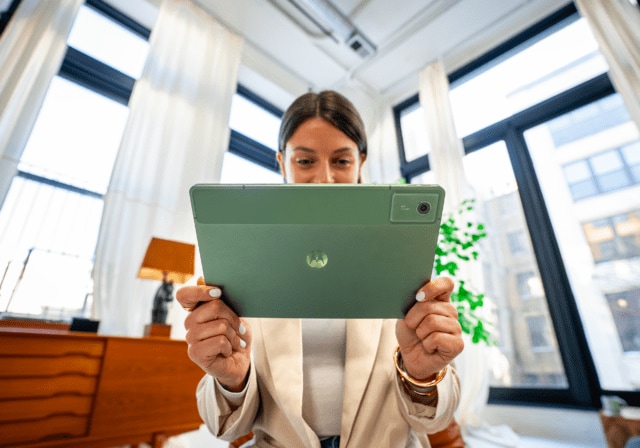
The [moto pad](https://www.t-mobile.com/tablet/motorola-moto-pad-2026) - 2026 marks a notable step as the first Motorola tablet available in the U.S., bringing together productivity, entertainment, and cross-device connectivity in one portable device. With a sharp display, 5G connectivity, and thoughtful software features, this new Motorola tablet is designed to handle both work and play without overcomplicating things.
- Share "moto pad – 2026: Motorola Tablet Specs, Features, and More" on X
- Share "moto pad – 2026: Motorola Tablet Specs, Features, and More" on Facebook
- Share "moto pad – 2026: Motorola Tablet Specs, Features, and More" on LinkedIn
In this article, we’ll break down the moto pad specs, highlight key features like performance and battery life, and explore how this new Motorola tablet fits into everyday use.
## Key takeaways about the moto pad
- The moto pad combines an 11-inch 2.5K display with a 90Hz refresh rate for smooth visuals and everyday usability.
- Built-in 5G connectivity and a MediaTek D6300 processor support multitasking, streaming, and on-the-go productivity.
- Smart Connect and cross-device features help unify your phone, tablet, and PC into one flexible workflow.
[Shop moto pad - 2026](https://www.t-mobile.com/tablet/motorola-moto-pad-2026)
## moto pad – 2026 specs at a glance
If you want a quick overview before diving deeper, the table below highlights the core moto pad specs and features.
| Feature | moto pad |
|--------------|------------------------------------------|
| Display | 11-inch, 2.5K (2560 × 1600), 90Hz |
| Processor | MediaTek D6300 5G, octa-core |
| Connectivity | 5G, Wi-Fi 5, Bluetooth 5.2 |
| Battery | 7040mAh, up to 12 hours video streaming |
| Charging | 20W wired charging |
| Storage | 128GB (expandable up to 2TB via microSD) |
| RAM | 8GB |
| Audio | Quad speakers with Dolby Atmos® |
| Cameras | 8MP rear, 5MP front |
| OS | Android 15 (upgradable to Android 17) |
| Design | All-metal, IP52 rating |
This combination of specs positions the device as a well-rounded option for everyday tasks, media consumption, and light productivity.
## A closer look at the display and design
The display is one of the most noticeable features of the moto pad. It uses an 11-inch screen with 2.5K resolution, which can make text look crisp and videos appear detailed. The 90Hz refresh rate also helps interactions feel smoother when scrolling or switching between apps.
Brightness reaches up to 500 nits, which helps with visibility in a range of indoor and moderately bright environments.
The design leans toward simplicity and durability. The tablet features an all-metal body with rounded edges, which can make it more comfortable to hold over longer sessions. It also includes an IP52 rating, meaning it offers some resistance to dust and light splashes.
## Performance, 5G connectivity, and everyday speed
At the core of the moto pad is the MediaTek D6300 5G processor. This octa-core chipset is built to support everyday multitasking, such as streaming videos, browsing, and running multiple apps at once.
The addition of 5G connectivity is a key differentiator for a tablet in this category. It allows you to stay connected even when Wi-Fi isn’t available, which can be useful for streaming, downloading files, or working remotely.
With 8GB of RAM and 128GB of storage, the device is designed to handle typical usage without frequent slowdowns. If you need more space, microSD expansion up to 2TB provides additional flexibility.
## Smart features that connect your devices
One of the more practical aspects of the Motorola tablet experience is Smart Connect, which focuses on linking your devices together. Instead of treating your tablet as a standalone screen, it becomes part of a broader ecosystem.
Here’s how those features can show up in real use:
- Move files between your phone, tablet, and PC using simple drag-and-drop
- Mirror or extend your PC display onto the tablet for multitasking
- Use one keyboard and mouse across multiple devices
- Access notifications and apps across screens without switching devices
These tools are designed to reduce friction when switching between tasks, especially if you regularly move between devices during the day.
Another built-in feature, Circle to Search with Google, lets you highlight something on your screen and search or translate it instantly without leaving your current app.
## Battery life, charging, and day-to-day reliability
Battery performance plays a major role in how useful a tablet feels throughout the day. The moto pad includes a 7040mAh battery, which is designed to support extended use across different activities.
Under typical conditions, it can support up to 12 hours of video streaming. Actual results will vary based on usage, software, settings, and network conditions. Charging is handled through a 20W wired connection, which can recharge a depleted battery in approximately 2.5 hours under typical conditions. Charger sold separately.
The balance between battery size and efficiency makes it a practical option for both short sessions and longer, uninterrupted use.
## Audio, cameras, and everyday features
While tablets are often judged by display and performance, audio and camera quality still matter for calls, streaming, and casual photography.
The moto pad includes:
- Quad speakers tuned by Dolby Atmos®, which can provide a more immersive audio experience for movies and music
- A rear 8MP camera for quick photos or document capture
- A front 5MP camera for video calls and virtual meetings
There’s also support for features like face unlock and built-in security protections, which help add convenience without complicating setup.
## How the moto pad fits different use cases
The moto pad is designed to adapt to a variety of everyday scenarios rather than focus on just one type of user. Here’s how it may fit into different routines:
### For productivity
You can split your screen, run multiple apps, and connect to a PC for extended display use. This setup may help with document editing, multitasking, or managing workflows across devices.
### For entertainment
The combination of a 2.5K display and quad speakers makes this Motorola tablet a capable option for streaming, gaming, and video playback.
### For communication
Video calls, messaging, and file sharing are supported through built-in cameras, microphones, and connectivity features.
### For on-the-go use
With 5G connectivity, you may not need to rely on public Wi-Fi, which can make it easier to stay connected while traveling or commuting.
This flexibility makes it a general-purpose tablet that can shift between roles depending on what you need throughout the day.
## Should you upgrade to the Motorola moto pad?
If you’re [considering a new tablet](https://www.t-mobile.com/tablets), the decision often comes down to what you’re upgrading from and how you plan to use it.
Here’s a simple way to think about it:
| If your current tablet… | You may notice improvements with moto pad |
|---------------------------------------|--------------------------------------------------------------------------------------------|
| Has an older display | Sharper resolution and smoother scrolling with the 2.5K screen and 90Hz refresh rate |
| Lacks cellular connectivity | 5G capable for on-the-go access on T-Mobile’s Network |
| Struggles with multitasking | Improved performance and split-screen support powered by MediaTek Dimensity 6300 processor |
| Has limited storage | Expandable storage up to 2TB |
| Feels disconnected from other devices | Better cross-device integration with Smart Connect |
Because this is Motorola’s first U.S. tablet, it introduces features that focus on flexibility and connectivity rather than just raw specs. If your current device feels outdated or limited, this model may offer a more modern experience.
## FAQs about the moto pad
__What are the key moto pad specs?__
The moto pad includes an 11-inch 2.5K display, MediaTek D6300 processor, 8GB RAM, 128GB storage, and a 7040mAh battery. It also supports 5G connectivity and expandable storage.
__Does the moto pad support 5G connectivity?__
Yes, the tablet includes 5G support on the T-Mobile Network, which can allow for faster downloads and streaming without relying on Wi-Fi.
__How long does the moto pad battery last?__
Battery life can vary, but it may support up to about 12 hours of video streaming under typical conditions.
__Can you expand storage on the Motorola tablet?__
Yes, the device supports microSD cards up to 2TB, giving you more flexibility for storing apps, files, and media.
__What operating system does the moto pad use?__
It launches with Android 15, and Motorola has committed to upgrades through Android 17, along with three years of security updates.
__Is the moto pad good for multitasking?__
The tablet supports split-screen apps and floating windows, which can help with multitasking across different tasks.
__Does the moto pad have good speakers?__
It includes four speakers tuned by Dolby Atmos®, which can improve sound quality for media and games.
__What is Smart Connect on the moto pad?__
Smart Connect allows you to link your tablet with your phone and PC, making it easier to share files and manage tasks across devices.
__Can the moto pad be used for video calls?__
Yes, it includes a front-facing camera and microphone, making it suitable for video calls and virtual meetings.
__Does the moto pad support accessories?__
The device includes standard connectivity options like Bluetooth and USB-C, which can support compatible accessories.
__Is the moto pad water-resistant?__
It has an IP52 rating, which means it offers limited protection against dust and light splashes.
__How fast does the moto pad charge?__
It supports 20W wired charging. Charger sold separately.
## What to know about the moto pad before you buy
The moto pad brings together a strong display, reliable performance, and built-in 5G connectivity in a single device. It focuses on flexibility, making it suitable for a range of everyday tasks without locking you into a single use case.
If you’re upgrading from an older tablet, you may notice improvements in speed, display quality, and how easily your devices work together. For anyone looking for a capable new tablet, the moto pad offers a balanced mix of features designed to keep up with daily life. Shop the moto pad at T-Mobile today.
*\*This guide was created by T-Mobile to help you explore tablets in our store. The opinions expressed here reflect our editorial perspective based on publicly available features, specifications, and articles.*
__You might also be interested in:__
[4 Most Affordable Tablets](https://www.t-mobile.com/dialed-in/devices/most-affordable-tablets)
[Shop Tablets](https://www.t-mobile.com/tablets)
[Motorola Deals](https://www.t-mobile.com/offers/motorola-phone-deals)
__Sources:__
- [https://motorolanews.com/introducing-moto-g-stylus-2026-and-moto-pad-2026-where-ideas-take-shape-across-screens/](https://motorolanews.com/introducing-moto-g-stylus-2026-and-moto-pad-2026-where-ideas-take-shape-across-screens/)
- [https://www.motorola.com/us/en/p/tablets/moto-pad/zzitztt2575](https://www.motorola.com/us/en/p/tablets/moto-pad/zzitztt2575)
Tags
- [Device Reviews](https://www.t-mobile.com/dialed-in/archive/device-reviews)
- [Tablet](https://www.t-mobile.com/dialed-in/archive/tablet)
## Related Articles
NEW
[Read More](https://www.t-mobile.com/dialed-in/devices/upgrade-your-iphone)
[](https://www.t-mobile.com/dialed-in/devices/upgrade-your-iphone)
[Devices](https://www.t-mobile.com/dialed-in/category/devices)
## [How and Why to Upgrade Your iPhone](https://www.t-mobile.com/dialed-in/devices/upgrade-your-iphone)
September 17, 2026
NEW
[Read More](https://www.t-mobile.com/dialed-in/devices/iphone-18-series-specs-features)
[](https://www.t-mobile.com/dialed-in/devices/iphone-18-series-specs-features)
[Devices](https://www.t-mobile.com/dialed-in/category/devices)
## [iPhone 18 Pro, Pro Max, and Duo: Full Specs, Price and Release Dates](https://www.t-mobile.com/dialed-in/devices/iphone-18-series-specs-features)
September 11, 2026
NEW
[Read More](https://www.t-mobile.com/dialed-in/devices/first-iphone)
[](https://www.t-mobile.com/dialed-in/devices/first-iphone)
[Devices](https://www.t-mobile.com/dialed-in/category/devices)
## [Apple’s First iPhone: How It Looked and What It Could Do](https://www.t-mobile.com/dialed-in/devices/first-iphone)
September 18, 2026
### Get Connected with T-Mobile! Shop Now for your ideal phone.
[Shop now](https://www.t-mobile.com/cell-phones)
## Follow T-Mobile
- [](https://www.instagram.com/tmobile/)
- [](https://www.facebook.com/TMobile)
- [](https://twitter.com/TMobile)
- [](https://www.youtube.com/user/TMobile/custom)
[English](https://t-mobile.com)[Español](https://es.t-mobile.com)
Even more plans
Even more plans
- [Senior phone plans](https://www.t-mobile.com/cell-phone-plans/unlimited-55-senior-discount-plans)
- [International phone plans](https://www.t-mobile.com/cell-phone-plans/international-roaming-plans)
- [International passes](https://www.t-mobile.com/cell-phone-plans/international-roaming-plans/unlimited-calling-data-pass)
- [Home Internet plans](https://www.t-mobile.com/home-internet/plans)
- [Phone and internet bundles](https://www.t-mobile.com/cell-phone-plans/phone-home-internet-bundle)
- [Hotspot plans](https://www.t-mobile.com/cell-phone-plans/affordable-data-plans/hotspots)
- [Business phone plans](https://www.t-mobile.com/business/wireless-business-plans)
Shop devices by brand
Shop devices by brand
- [iPhones](https://www.t-mobile.com/cell-phones/brand/apple)
- [iPads](https://www.t-mobile.com/tablets/brand/apple)
- [Apple Watches](https://www.t-mobile.com/smart-watches/brand/apple)
- [Galaxy phones](https://www.t-mobile.com/cell-phones/brand/samsung)
- [Samsung tablets](https://www.t-mobile.com/tablets/brand/samsung)
- [Samsung watches](https://www.t-mobile.com/smart-watches/brand/samsung)
- [Motorola phones](https://www.t-mobile.com/cell-phones/brand/motorola)
- [Google Pixel phones](https://www.t-mobile.com/cell-phones/brand/google)
New featured cell phones
New featured cell phones
- [New Apple iPhone Duo](https://www.t-mobile.com/cell-phone/apple-iphone-duo)
- [New Apple iPhone 18 Pro](https://www.t-mobile.com/cell-phone/apple-iphone-18-pro)
- [New Apple iPhone 18 Pro Max](https://www.t-mobile.com/cell-phone/apple-iphone-18-pro-max)
- [New Apple iPhone Ultra](https://www.t-mobile.com/cell-phone/apple-iphone-ultra)
- [New Samsung Galaxy Z Fold8](https://www.t-mobile.com/cell-phone/samsung-galaxy-z-fold8)
- [New Google Pixel 11](https://www.t-mobile.com/cell-phone/google-pixel-11)
New featured tablets, smartwatches & more
New featured tablets, smartwatches & more
- [Apple iPad Mini (A17 Pro)](https://www.t-mobile.com/tablet/apple-ipad-mini-a17-pro)
- [Apple iPad (A16)](https://www.t-mobile.com/tablet/apple-ipad-a16)
- [Apple Watch SE 3 40mm](https://www.t-mobile.com/smart-watch/apple-watch-se-3-40mm)
- [T-Mobile Revvl Tab 2](https://www.t-mobile.com/tablet/t-mobile-revvl-tab-2)
- [Samsung Galaxy Tab A11+ 5G](https://www.t-mobile.com/tablet/samsung-galaxy-tab-a11-plus-5g)
- [Samsung Galaxy Watch Ultra2](https://www.t-mobile.com/smart-watch/samsung-galaxy-watch-ultra2)
Helpful consumer guides
Helpful consumer guides
- [Dialed In](https://www.t-mobile.com/dialed-in)
- [Cell Phone BYOD Guide](https://www.t-mobile.com/dialed-in/devices/what-is-byod-bring-your-own-device)
- [The 6 Best Samsung Phones of 2026](https://www.t-mobile.com/dialed-in/devices/best-samsung-phones)
- [iPhone 18 Series: Specs, Price and Release Dates](https://www.t-mobile.com/dialed-in/devices/iphone-18-series-specs-features)
- [How Does Satellite Phone Service Work?](https://www.t-mobile.com/dialed-in/wireless/how-satellite-phone-service-works)
T-Mobile customer benefits
T-Mobile customer benefits
- [TV streaming deals](https://www.t-mobile.com/tv-streaming)
- [T-Mobile Tuesdays](https://www.t-mobile.com/offers/t-mobile-tuesdays)
- [In-flight wi-fi](https://www.t-mobile.com/benefits/travel/in-flight-wifi)
- [Refer-a-Friend](https://referral.t-mobile.com/)
- [Device protection plan](https://www.t-mobile.com/benefits/phone-protection-plans)
- [Protection 360® HomeTech](https://www.t-mobile.com/benefits/phone-protection-plans/p360-home-tech)
Switch to T-Mobile
Switch to T-Mobile
- [How to switch to T-Mobile](https://www.t-mobile.com/resources/how-to-join-us)
- [Try our 5G network](https://www.t-mobile.com/offers/free-trial)
- [Bring your own device](https://www.t-mobile.com/resources/bring-your-own-phone)
- [Switch to T-Mobile from Verizon or AT&T](https://www.t-mobile.com/switch/keep-phone-switch-from-verizon-or-att)
- [Family freedom deal](https://www.t-mobile.com/switch/pay-off-carrier-etf-phone-deal)
- [Cell phone trade-in](https://www.t-mobile.com/devices/phone-trade-in)
Additional support
Additional support
- [View return policy](https://www.t-mobile.com/responsibility/legal/return-policy)
- [Contact us](https://www.t-mobile.com/contact-us)
- [Billing](https://www.t-mobile.com/support/account/whats-impacting-your-bill)
- [Shipping & pickup options](https://www.t-mobile.com/customers/shipping-dates)
- [Free Internet for Students](https://www.t-mobile.com/brand/project-10-million)
- [Redeem a rebate](https://promotions.t-mobile.com/)
- [Domestic Violence Resources](https://www.t-mobile.com/support/account/keeping-customers-safe-connected)
About T-Mobile
About T-Mobile
- [Our Story](https://www.t-mobile.com/our-story)
- [T-Mobile careers](https://careers.t-mobile.com/)
- [Privacy Center](https://www.t-mobile.com/privacy-center)
- [Newsroom](https://www.t-mobile.com/news)
- [Corporate Responsibility](https://www.t-mobile.com/responsibility)
[](https://www.t-mobile.com)
- [About](https://www.t-mobile.com/our-story)
- [Investor relations](https://investor.t-mobile.com/default.aspx)
- [Press](https://www.t-mobile.com/news)
- [Careers](https://careers.t-mobile.com)
- [Deutsche Telekom](https://www.telekom.com/en)
- [Puerto Rico](https://www.t-mobilepr.com/)
- [Privacy Notice](https://www.t-mobile.com/privacy-center/privacy-notices/t-mobile-privacy-notice)
- [Trust Center](https://security.t-mobile.com/)
- [Privacy Center](https://www.t-mobile.com/privacy-center)
- [Consumer information](https://www.t-mobile.com/responsibility/consumer-info)
- [Public safety/911](https://www.t-mobile.com/responsibility/consumer-info/safety/9-1-1)
- [Terms & conditions](https://www.t-mobile.com/responsibility/legal/terms-and-conditions)
- [Terms of use](https://www.t-mobile.com/responsibility/consumer-info/policies/terms-of-use)
- [Accessibility](https://www.t-mobile.com/responsibility/consumer-info/accessibility-policy)
- [Open Internet](https://www.t-mobile.com/responsibility/consumer-info/policies/internet-service)
- [Do Not Sell or Share My Personal Information](javascript:void%280%29)
- [Licenses & Patents](https://www.t-mobile.com/responsibility/legal/licenses-and-patents)
- [Consumer Health Data Privacy Notice](https://www.t-mobile.com/privacy-center/privacy-notices/t-mobile-privacy-notice.html#health-data-privacy-notice)
- [T-Mobile, the T logo, Magenta and the magenta color are registered trademarks of Deutsche Telekom AG.](https://www.t-mobile.com)
- [](https://www.instagram.com/tmobile/)
- [](https://www.facebook.com/TMobile)
- [](https://twitter.com/TMobile)
- [](https://www.youtube.com/user/TMobile/custom)
© 2026 T‑Mobile USA, Inc.
Top