[Skip to content](https://www.t-mobile.com/dialed-in/devices/ipad-air-m4-features-price-guide#maincontent)

Hey, looks like you need help finding something. I am here to chat if you have any questions
Skip to main content Skip to footer
[Wireless](https://www.t-mobile.com/)
[Business](https://www.t-mobile.com/business)
[Prepaid](https://prepaid.t-mobile.com/home)
[Internet](https://www.t-mobile.com/home-internet)
[](https://www.t-mobile.com)
Log in
[Plans](https://www.t-mobile.com/cell-phone-plans)
[Unlimited Phone Plans](https://www.t-mobile.com/cell-phone-plans)[Unlimited Age 55+](https://www.t-mobile.com/cell-phone-plans/unlimited-55-senior-discount-plans)[Military & Veterans](https://www.t-mobile.com/cell-phone-plans/military-discount-plans)[First Responder](https://www.t-mobile.com/cell-phone-plans/first-responder-discounts)[College Students](https://www.t-mobile.com/cell-phone-plans/student-discounts)[5G Home Internet Plans](https://www.t-mobile.com/home-internet/plans)[Fiber Internet Plans](https://www.t-mobile.com/home-internet/fiber)[Watch & Tablet Plans](https://www.t-mobile.com/cell-phone-plans/affordable-data-plans)[Prepaid Phone Plans](https://prepaid.t-mobile.com/prepaid-plans)[Business Phone Plans](https://www.t-mobile.com/business/wireless-business-plans)
[Phones & devices](https://www.t-mobile.com/cell-phones)
[Cell phones](https://www.t-mobile.com/cell-phones)[5G phones](https://www.t-mobile.com/5g/phones)[Tablets](https://www.t-mobile.com/tablets)[Smartwatches](https://www.t-mobile.com/smart-watches)[Hotspots & more](https://www.t-mobile.com/hotspots-iot-connected-devices)[Accessories](https://www.t-mobile.com/accessories)[Bring your own device](https://www.t-mobile.com/resources/bring-your-own-phone)[Tech Gift Ideas](https://www.t-mobile.com/devices/tech-gifts)
[Deals](https://www.t-mobile.com/offers)
[See all deals](https://www.t-mobile.com/offers)[Apple](https://www.t-mobile.com/offers/apple-iphone-deals)[Samsung](https://www.t-mobile.com/offers/samsung-phone-deals)[Motorola](https://www.t-mobile.com/offers/motorola-phone-deals)[Google](https://www.t-mobile.com/offers/google-phone-deals)[Revvl](https://www.t-mobile.com/offers/t-mobile-revvl-phone-deals)[Free & Zero Down Phones](https://www.t-mobile.com/switch/free-cell-phone-with-plan)
[Coverage](https://www.t-mobile.com/coverage/network)
[Our network](https://www.t-mobile.com/coverage/network)[4G & 5G Coverage map](https://www.t-mobile.com/coverage/coverage-map)[What is 5G](https://www.t-mobile.com/5g)[Satellite Phone Service](https://www.t-mobile.com/coverage/satellite-phone-service)[Rural & Small Towns](https://www.t-mobile.com/coverage/small-towns-rural-areas)[Try our network](https://www.t-mobile.com/offers/free-trial)[5G news](https://www.t-mobile.com/news/category/network)[Home Internet](https://www.t-mobile.com/home-internet/eligibility)
[Join Us](https://www.t-mobile.com/resources/how-to-join-us)
[How to switch](https://www.t-mobile.com/resources/how-to-join-us)[Bring your own phone](https://www.t-mobile.com/resources/bring-your-own-phone)[Keep your number](https://www.t-mobile.com/resources/keep-your-number)[Keep & switch](https://www.t-mobile.com/switch/keep-phone-switch-from-verizon-or-att)[Benefits](https://www.t-mobile.com/benefits)[Find your reason](https://www.t-mobile.com/membership)[T-Mobile Tuesdays](https://www.t-mobile.com/offers/t-mobile-tuesdays)
[Contact & support](https://www.t-mobile.com/contact-us)
[](https://www.t-mobile.com)[1-800-T-MOBILE](tel:1-800-866-2453)[Check order status](https://www.t-mobile.com/orders/check-order)[Help & support](https://www.t-mobile.com/support)[](https://www.t-mobile.com)
[Cart](https://www.t-mobile.com/cart)
Search
- POPULAR
[Search](javascript:void%280%29)
My account
more from T-Mobile
- [Wireless](https://www.t-mobile.com/)
- [Business](https://www.t-mobile.com/business)
- [Prepaid](https://prepaid.t-mobile.com/home)
- [Internet](https://www.t-mobile.com/home-internet)
Legal
- [Privacy Policy](https://www.t-mobile.com/privacy-center/our-practices/privacy-policy)
- [Do Not Sell My Personal Information](javascript:void%280%29)
- [Privacy Center](https://www.t-mobile.com/privacy-center)
[Log in](https://www.t-mobile.com)
[Bill pay](https://www.t-mobile.com/signin?state=eyJpbnRlbnQiOiJQYXltZW50IiwiYm9va21hcmtVcmwiOiJodHRwczovL215LnQtbW9iaWxlLmNvbS9vbmV0aW1lcGF5bWVudCJ9) [Add a line](https://www.t-mobile.com/commerce/device-intent) [Upgrade](https://www.t-mobile.com/purchase/shop) [Check order status](https://www.t-mobile.com/orders/check-order) [Ask the Community](https://www.t-mobile.com/community)
[Dialed In](https://www.t-mobile.com/dialed-in)
- [All Blogs](https://www.t-mobile.com/dialed-in/latest)
- [Devices](https://www.t-mobile.com/dialed-in/category/devices)
- [Accessories](https://www.t-mobile.com/dialed-in/category/accessories)
- [Tips & Tricks](https://www.t-mobile.com/dialed-in/category/tips-tricks)
- [Wireless 101](https://www.t-mobile.com/dialed-in/category/wireless)
- [The Signal](https://www.t-mobile.com/home-internet/the-signal/)
- [Newsroom](https://www.t-mobile.com/news)
- [All Blogs](https://www.t-mobile.com/dialed-in/latest)
- [Devices](https://www.t-mobile.com/dialed-in/category/devices)
- [Accessories](https://www.t-mobile.com/dialed-in/category/accessories)
- [Tips & Tricks](https://www.t-mobile.com/dialed-in/category/tips-tricks)
- [Wireless 101](https://www.t-mobile.com/dialed-in/category/wireless)
- [The Signal](https://www.t-mobile.com/home-internet/the-signal/)
- [Newsroom](https://www.t-mobile.com/news)
1. [Dialed In](https://www.t-mobile.com/dialed-in)
2. Category:[Devices](https://www.t-mobile.com/dialed-in/category/devices)
[DevicesCategory](https://www.t-mobile.com/dialed-in/category/devices)
# Apple iPad Air M4: Complete Guide to Specs and Pricing
Published: March 17, 2026
|14 min read
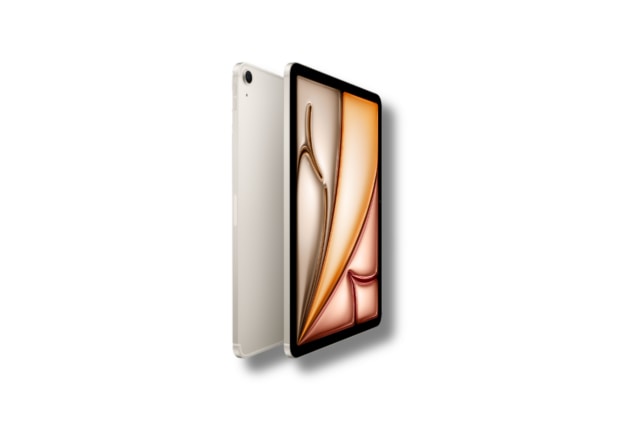
Apple’s new [iPad Air M4](https://www.t-mobile.com/tablet/apple-ipad-pro-13-inch-m4) lands squarely in the sweet spot of the lineup—more power and modern features than the entry iPad, without the premium price of iPad Pro.
- Share "Apple iPad Air M4: Complete Guide to Specs and Pricing " on X
- Share "Apple iPad Air M4: Complete Guide to Specs and Pricing " on Facebook
- Share "Apple iPad Air M4: Complete Guide to Specs and Pricing " on LinkedIn
What is the Apple iPad Air M4? It’s Apple’s mainstream performance tablet: thin, light, and powerful, with [11‑inch](https://www.t-mobile.com/tablet/apple-ipad-air-11-inch-m4) and [13‑inch](https://www.t-mobile.com/tablet/apple-ipad-air-13-inch-m4) Liquid Retina displays, Center Stage cameras, and all‑day battery life. Headline upgrades include the M4 chip for faster CPU/GPU performance, a 16‑core Neural Engine that supercharges Apple Intelligence features in iPadOS 26, and next‑gen connectivity with Wi‑Fi 7, while the clean aluminum design and beloved accessories carry over.
In this article, you’ll find a complete look at Apple iPad Air M4 specs, and clear pricing and buying advice to help you pick the right configuration.
*\*This guide was created by T-Mobile to help you explore Apple tablets in our store. The opinions expressed here reflect our editorial perspective based on publicly available features, specifications, and articles.*
[SHOP Apple iPad M4](https://www.t-mobile.com/tablet/apple-ipad-air-11-inch-m4)
## Key takeaways for the Apple iPad M4
- The iPad Air M4 delivers faster CPU and GPU performance plus a 16-core Neural Engine, making multitasking, gaming, and creative workflows noticeably smoother than prior Air models.
- The Apple iPad Air M4 features the M4 chip with faster CPU/GPU and a 16‑core Neural Engine, 12GB unified memory, 128GB–1TB storage, 11‑inch or 13‑inch Liquid Retina displays, Center Stage cameras, all‑day battery life, and iPadOS 26 with Apple Intelligence.
- Apple prices the iPad Air M4 similarly to the prior M3 generation across 11‑inch and 13‑inch Wi‑Fi or cellular models with 128GB–1TB storage, starting at $599 and $799, and offers discounted education pricing for eligible buyers.
## iPad Air M4 models, configurations, and pricing
Apple offers the iPad Air M4 in two sizes—11‑inch and 13‑inch—each available in Wi‑Fi or Wi‑Fi + Cellular models. Storage spans from 128GB for essentials to 1TB for creators managing large media libraries. Memory is unified at 12GB across configurations for smooth multitasking and Apple Intelligence features.
Pricing aligns closely with the prior [M3 iPad Air generation](https://www.t-mobile.com/news/devices/t-mobile-new-ipad). With a starting price of $599 for the 11-inch model and $799 for the 13-inch model, the iPad Air M4 delivers premium performance at a compelling mid-range price. That means you can expect familiar entry points for the 11‑inch Wi‑Fi model, step‑ups for cellular connectivity, and measured surcharges as you move from 128GB toward 1TB.
Looking to save? [Education pricing](https://www.apple.com/us-edu/store) begins at $549 for the 11-inch and $749 for the 13-inch, making it even more accessible for students and educators. Back‑to‑school and holiday windows often bring the best deals at major retailers and carriers. If you don’t need cellular, the base Wi‑Fi configuration typically offers the best value, while trade‑in programs can trim upgrade costs for owners of older iPads.
| Model | Size | Base storage | Wireless options | Base price (Wi‑Fi) | Base price (Cellular) |
|-------------------------------------------------------------------------------------------------------------------------------------------------|-----------------------|-------------------|-------------------------------|-------------------------------------------------|-------------------------------------------------------------------|
| [](https://www.t-mobile.com/tablet/apple-ipad-air-11-inch-m4)[iPad Air M4 (11-inch)](https://www.t-mobile.com/tablet/apple-ipad-air-11-inch-m4) | 11‑inch Liquid Retina | 128GB (up to 1TB) | Wi‑Fi 7 or Wi‑Fi 7 + 5G (C1X) | Consistent with prior M3 generation at launch | Slight premium over Wi‑Fi; carrier promos may reduce upfront cost |
| [](https://www.t-mobile.com/tablet/apple-ipad-pro-13-inch-m4)[iPad Air M4 (13-inch)](https://www.t-mobile.com/tablet/apple-ipad-air-13-inch-m4) | 13‑inch Liquid Retina | 128GB (up to 1TB) | Wi‑Fi 7 or Wi‑Fi 7 + 5G (C1X) | Aligned to M3‑era 13‑inch Air pricing structure | Adds cellular premium; multi‑line plans may offer savings |
## Apple iPad Air M4 specs at a glance
Storage recommendations vary by use case: students and casual users are usually well served by 128GB–256GB, while creators and pros working with large photos or 4K video should look to 512GB–1TB. The standard 12GB unified memory helps keep apps and Apple Intelligence features responsive even with multiple workflows in play.
Have questions about memory or storage? Short answer: memory is fixed at 12GB and benefits every configuration; storage is the only capacity you choose—pick enough to cover your largest projects plus headroom for the next few years.
- __Chip__: Apple M4 with faster CPU and GPU plus a 16‑core Neural Engine for on‑device AI and Apple Intelligence in iPadOS 26.
- __Memory__: 12GB unified memory for smooth multitasking and complex creative apps.
- __Storage:__ 128GB, 256GB, 512GB, or 1TB options depending on your needs.
- __Displays__: 11‑inch or 13‑inch Liquid Retina—crisp, color‑accurate panels suited to reading, sketching, and editing.
- __Cameras__: Front and rear cameras with Center Stage support for dynamic framing on video calls; reliable for scanning documents and casual photos.
- __Battery__: All‑day battery life designed to last through work or class, with fast charging over USB‑C.
- __Software__: iPadOS 26 with Apple Intelligence features for writing, image creation, and smart organization.
- __Connectivity (Wi‑Fi models)__: N1 wireless chip enabling Wi‑Fi 7, Bluetooth 6, and Thread for smart‑home interoperability.
- __Connectivity (cellular models)__: C1X modem with 5G for faster speeds and improved efficiency.
- __Audio and accessories__: Stereo speakers, support for Apple Pencil Pro and Magic Keyboard accessories.
## iPad air M4 performance, M4 chip, and Apple Intelligence
The iPad Air’s leap to M4 brings meaningful gains over M3 and a dramatic step up from M1, spanning CPU, GPU, and the Neural Engine. In practice, that translates to snappier multitasking, smoother timelines in video editors like Final Cut Pro, and more responsive Apple Intelligence features in iPadOS 26.
The 16‑core Neural Engine accelerates on‑device AI for privacy and speed—powering features such as content creation helpers, smarter photo and video tools, and more contextual suggestions. The upgraded GPU enables richer visuals in modern games and creative apps, with improved lighting, reflections, and effects in titles that support advanced graphics features.
Will you feel the difference? If you’re coming from an M1 iPad Air or an older A‑series iPad, yes—everything from note‑taking to multi‑app workflows feels faster and more fluid. From M3, you’ll see improvements in AI‑driven features and heavier creative workloads, while light users may appreciate the added headroom more than raw speed gains.
The M4 in iPad Air delivers a clear uptick in CPU, GPU, and on‑device AI performance over prior Air generations—most noticeable in creative apps, gaming, and multitasking.
## iPad Air M4 connectivity: N1 wireless chip, C1X modem, and 5G
Networking gets a big boost. The N1 wireless chip unlocks Wi‑Fi 7, Bluetooth 6, and Thread support. In plain terms, that means faster peak Wi‑Fi speeds where supported, lower latency for smooth video calls and cloud apps, better accessory connections, and a more resilient smart‑home experience. AirDrop and Personal Hotspot benefits from stronger, more efficient radios.
What does [Wi‑Fi 7](https://www.t-mobile.com/home-internet/the-signal/internet-help/what-is-wifi-7) do for you today? On compatible routers, large app downloads and iCloud restores finish quicker, and multiplayer games feel more responsive. Not on Wi‑Fi 7 yet? The iPad Air M4 remains fully compatible with existing routers and is effectively future‑proofed for your next network upgrade.
Cellular models add the C1X modem for speedy, power‑efficient 5G. Choose Wi‑Fi + Cellular if you work on the go, commute through congested networks, or want the security of avoiding public Wi‑Fi. Prefer to save? Wi‑Fi‑only models are great for home and campus use, and you can always tether from an iPhone when needed.
## iPad Air M4 design, display, and cameras
The iPad Air M4 keeps the minimal, durable aluminum design people love, now offered in a modern color palette that includes Space Gray, Blue, Purple, and Starlight. The flat‑edge chassis remains thin and light, with accessory rails and magnets right where you expect them.
Both 11‑inch and 13‑inch Liquid Retina displays deliver crisp text and vibrant color. The 11‑inch model maximizes portability, while the 13‑inch gives you room to split views, sketch with a larger canvas, or comfortably edit timelines. Color accuracy is tuned for creators, with wide‑gamut support and excellent uniformity.
For cameras, the front unit supports Center Stage to keep you in frame during video calls, while the rear camera handles document scans and casual photos with ease. Video calls look clear, and scanning receipts or whiteboards is quick and dependable.
| Model | Dimensions | Weight | Display details | Camera (front) | Camera (rear) |
|-----------------------|----------------------------------------------|---------------------------------------------------|----------------------------------------------------------------|-------------------------------------------------------|---------------------------------------------------------------|
| iPad Air M4 (11‑inch) | Thin, compact aluminum body | Lightweight for one‑hand use | 11‑inch Liquid Retina; color‑accurate, anti‑reflective coating | Supports Center Stage for dynamic framing in calls | Single wide camera; great for scans and casual photos |
| iPad Air M4 (13‑inch) | Larger aluminum chassis for more screen area | Still travel‑friendly; balanced in lap or on desk | 13‑inch Liquid Retina; more room for split view and editing | Supports Center Stage; ideal for at‑desk conferencing | Single wide camera; reliable for documents and quick captures |
## iPad Air M4 accessories, apps, and ecosystem
Accessories turn the iPad Air M4 into whatever you need: a notepad, a sketchbook, or a light laptop. Apple Pencil Pro brings precise input and pro‑grade tools for note‑takers and artists, while Magic Keyboard adds a responsive keyboard and trackpad for writing, email, and research.
The M4 chip lets pro and creator apps stretch out—Final Cut Pro, Pixelmator Pro, Goodnotes, Apple Creator Studio, and performance‑hungry 3D or music apps all benefit from higher compute and faster AI. And because it’s an Apple device, iCloud, Handoff, and Continuity keep your files and workflows moving smoothly across iPad, iPhone, and Mac.
Must‑haves by user: students often pair Apple Pencil Pro with the 11‑inch Air for note‑taking and PDF markup; creators typically favor the 13‑inch with Pencil Pro and ample storage; business travelers benefit from Magic Keyboard and the cellular model for always‑on connectivity.
- __Apple Pencil Pro__: pressure, tilt, and haptic‑enhanced precision for sketching, note‑taking, and illustration.
- __Magic Keyboard__: laptop‑like typing with a trackpad and adjustable viewing angles.
- __Creative apps__: Final Cut Pro, Pixelmator Pro, Apple Creator Studio, Goodnotes, Onform—optimized for M‑class performance and Neural Engine features.
- __Ecosystem perks__: iCloud Drive, Handoff, AirDrop, and Continuity Camera streamline moving work between iPhone, iPad, and Mac.
- __Protection and power__: sturdy case or sleeve, a USB‑C fast charger, and a privacy screen for class or travel.
## Who is the iPad Air M4 best for?
Students and educators will love the balance of power and portability—pair the 11‑inch with Apple Pencil Pro for note‑taking and pick 256GB if you juggle lots of courses. Mobile professionals should consider the 13‑inch with Magic Keyboard and Wi‑Fi + Cellular for productivity anywhere. Creators benefit most from the M4’s GPU and Neural Engine gains; opt for 512GB–1TB if you work with large media.
Casual users and families get a long‑lived, future‑proof tablet with Apple Intelligence features that streamline everyday tasks like writing, organizing, and light photo/video edits. If you’re moving from an older A‑series iPad or M1 Air, the M4 jump feels substantial. M3 owners who aren’t hitting performance limits can take a wait‑and‑see approach unless you want the latest AI features and connectivity.
Can it replace a laptop? For many workflows—writing, research, meetings, and creative apps—the Air plus Magic Keyboard and Pencil Pro is a credible laptop alternative. If your job requires niche desktop software or heavy multi‑monitor setups, iPad complements rather than replaces your Mac or PC.
## iPad Air M4 vs. previous iPad Air models (M3 and M1)
Deciding whether to upgrade your iPad? Here’s how the M4 iPad Air stacks up against the M3 and M1 generations in the areas that matter most. The through‑line: M4 brings the biggest jump in AI and connectivity, with real‑world performance wins you’ll feel in creative apps and multitasking.
Owners of M1 or older iPads will see a transformative leap in speed, camera experience for calls, and future‑readiness thanks to Wi‑Fi 7 and Apple Intelligence. From M3, the upgrade is more situational: if you push graphics, rely on AI features, or want Wi‑Fi 7 or 5G improvements, M4 is compelling; light users can comfortably wait.
Accessories and design continuity help keep upgrade costs down—your existing Apple Pencil Pro and Magic Keyboard carry over, and workflows feel instantly familiar on day one.
- __Performance__: M4 delivers faster CPU/GPU and a more powerful Neural Engine versus M3; it’s a major step up from M1 for creative workloads.
- __Memory__: 12GB unified memory on M4 improves multitasking headroom compared with older Airs.
- __Connectivity__: N1 wireless chip (Wi‑Fi 7, Bluetooth 6, Thread) and C1X 5G modem on M4 surpass older Wi‑Fi and cellular standards in prior models.
- __AI and software__: iPadOS 26 with Apple Intelligence scales better on M4’s Neural Engine than on earlier chips.
- __Value__: Pricing tracks the M3 generation; upgrade value is strongest for M1 and earlier, and targeted for M3 owners who want AI/connectivity gains.
## Apple iPad Air M4 FAQs
__What are the Apple iPad Air M4 specs?__
M4 chip with faster CPU/GPU and a 16‑core Neural Engine, 12GB unified memory, 128GB–1TB storage, 11‑inch or 13‑inch Liquid Retina display, Center Stage cameras, all‑day battery life, and iPadOS 26 with Apple Intelligence. Wi‑Fi 7 (N1 chip) and 5G (C1X modem on cellular models).
__What colors does the iPad Air M4 come in?__
The iPad Air M4 is available in Space Gray, Blue, Purple, and Starlight, maintaining Apple’s modern, minimalist aesthetic.
__Is the iPad Air M4 compatible with Magic Keyboard?__
Yes. The iPad Air M4 works with the latest Magic Keyboard for iPad Air, giving you a laptop-style typing experience with a built-in trackpad and adjustable viewing angles.
__Does the iPad Air M4 support Wi-Fi 7?__
Yes. The new N1 wireless chip enables Wi-Fi 7, which offers faster speeds and lower latency on compatible routers. It also remains backward compatible with older Wi-Fi standards.
__Does the iPad Air M4 support Apple Pencil?__
Yes. The iPad Air M4 supports Apple Pencil Pro, which adds pressure sensitivity, tilt support, and haptic feedback for more precise note-taking and illustration. It magnetically attaches and charges on the side of the iPad Air.
__Is the iPad Air M4 good for gaming?__
Yes. The M4 chip’s upgraded GPU supports advanced graphics features and smoother frame rates in modern games. It’s well-suited for Apple Arcade titles and more demanding 3D games.
__Can the iPad Air M4 replace a laptop?__
For many users, yes. With Magic Keyboard and Apple Pencil Pro, it handles writing, research, video calls, multitasking, and creative work comfortably. However, users who rely on specialized desktop software or extensive external monitor setups may still prefer a Mac or PC.
__Is it worth upgrading from the M1 or M3 iPad Air?__
From M1 or older: Yes, you’ll see major gains in performance, AI features, and connectivity. From M3: The upgrade makes sense if you want stronger AI performance, Wi-Fi 7, or improved 5G efficiency. Light users may not need to upgrade yet.
__You may also be interested in:__
[Try Our Apple iPad Comparison Chart](https://www.t-mobile.com/devices/compare-ipad-models)
[Shop Apple Tablets](https://www.t-mobile.com/tablets/brand/apple)
[T‑Mobile Pairs iPhone 17e and iPad Air with Plans that Bring Built-in Value from Day One](https://www.t-mobile.com/news/devices/iphone-17e-ipad-air)
[A Guide to Choosing the Best iPad Case](https://www.t-mobile.com/dialed-in/accessories/best-ipad-cases)
__Sources:__
- [https://www.apple.com/newsroom/2026/03/apple-introduces-the-new-ipad-air-powered-by-m4/](https://www.apple.com/newsroom/2026/03/apple-introduces-the-new-ipad-air-powered-by-m4/)
- [https://www.macworld.com/article/3055278/2026-m4-ipad-air-design-display-specs-release-price.html](https://www.macworld.com/article/3055278/2026-m4-ipad-air-design-display-specs-release-price.html)
Tags
- [Apple](https://www.t-mobile.com/dialed-in/archive/apple)
- [Device Reviews](https://www.t-mobile.com/dialed-in/archive/device-reviews)
- [Tablet](https://www.t-mobile.com/dialed-in/archive/tablet)
## Related Articles
NEW
[Read More](https://www.t-mobile.com/dialed-in/devices/best-iphones)
[](https://www.t-mobile.com/dialed-in/devices/best-iphones)
[Devices](https://www.t-mobile.com/dialed-in/category/devices)
## [What is the Best iPhone of 2026? A Comprehensive Review of Our Top iPhone Picks](https://www.t-mobile.com/dialed-in/devices/best-iphones)
September 17, 2026
NEW
[Read More](https://www.t-mobile.com/dialed-in/devices/upgrade-your-iphone)
[](https://www.t-mobile.com/dialed-in/devices/upgrade-your-iphone)
[Devices](https://www.t-mobile.com/dialed-in/category/devices)
## [How and Why to Upgrade Your iPhone](https://www.t-mobile.com/dialed-in/devices/upgrade-your-iphone)
September 17, 2026
NEW
[Read More](https://www.t-mobile.com/dialed-in/devices/evolution-of-iphone)
[](https://www.t-mobile.com/dialed-in/devices/evolution-of-iphone)
[Devices](https://www.t-mobile.com/dialed-in/category/devices)
## [From the First iPhone to the iPhone 17 Series: The Timeline of Apple’s Pioneering Smartphone Series](https://www.t-mobile.com/dialed-in/devices/evolution-of-iphone)
September 17, 2026
### Get Connected with T-Mobile! Shop Now for your ideal phone.
[Shop now](https://www.t-mobile.com/cell-phones)
## Follow T-Mobile
- [](https://www.instagram.com/tmobile/)
- [](https://www.facebook.com/TMobile)
- [](https://twitter.com/TMobile)
- [](https://www.youtube.com/user/TMobile/custom)
[English](https://t-mobile.com)[Español](https://es.t-mobile.com)
Even more plans
Even more plans
- [Senior phone plans](https://www.t-mobile.com/cell-phone-plans/unlimited-55-senior-discount-plans)
- [International phone plans](https://www.t-mobile.com/cell-phone-plans/international-roaming-plans)
- [International passes](https://www.t-mobile.com/cell-phone-plans/international-roaming-plans/unlimited-calling-data-pass)
- [Home Internet plans](https://www.t-mobile.com/home-internet/plans)
- [Phone and internet bundles](https://www.t-mobile.com/cell-phone-plans/phone-home-internet-bundle)
- [Hotspot plans](https://www.t-mobile.com/cell-phone-plans/affordable-data-plans/hotspots)
- [Business phone plans](https://www.t-mobile.com/business/wireless-business-plans)
Shop devices by brand
Shop devices by brand
- [iPhones](https://www.t-mobile.com/cell-phones/brand/apple)
- [iPads](https://www.t-mobile.com/tablets/brand/apple)
- [Apple Watches](https://www.t-mobile.com/smart-watches/brand/apple)
- [Galaxy phones](https://www.t-mobile.com/cell-phones/brand/samsung)
- [Samsung tablets](https://www.t-mobile.com/tablets/brand/samsung)
- [Samsung watches](https://www.t-mobile.com/smart-watches/brand/samsung)
- [Motorola phones](https://www.t-mobile.com/cell-phones/brand/motorola)
- [Google Pixel phones](https://www.t-mobile.com/cell-phones/brand/google)
New featured cell phones
New featured cell phones
- [New Apple iPhone Duo](https://www.t-mobile.com/cell-phone/apple-iphone-duo)
- [New Apple iPhone 18 Pro](https://www.t-mobile.com/cell-phone/apple-iphone-18-pro)
- [New Apple iPhone 18 Pro Max](https://www.t-mobile.com/cell-phone/apple-iphone-18-pro-max)
- [New Apple iPhone Ultra](https://www.t-mobile.com/cell-phone/apple-iphone-ultra)
- [New Samsung Galaxy Z Fold8](https://www.t-mobile.com/cell-phone/samsung-galaxy-z-fold8)
- [New Google Pixel 11](https://www.t-mobile.com/cell-phone/google-pixel-11)
New featured tablets, smartwatches & more
New featured tablets, smartwatches & more
- [Apple iPad Mini (A17 Pro)](https://www.t-mobile.com/tablet/apple-ipad-mini-a17-pro)
- [Apple iPad (A16)](https://www.t-mobile.com/tablet/apple-ipad-a16)
- [Apple Watch SE 3 40mm](https://www.t-mobile.com/smart-watch/apple-watch-se-3-40mm)
- [T-Mobile Revvl Tab 2](https://www.t-mobile.com/tablet/t-mobile-revvl-tab-2)
- [Samsung Galaxy Tab A11+ 5G](https://www.t-mobile.com/tablet/samsung-galaxy-tab-a11-plus-5g)
- [Samsung Galaxy Watch Ultra2](https://www.t-mobile.com/smart-watch/samsung-galaxy-watch-ultra2)
Helpful consumer guides
Helpful consumer guides
- [Dialed In](https://www.t-mobile.com/dialed-in)
- [Cell Phone BYOD Guide](https://www.t-mobile.com/dialed-in/devices/what-is-byod-bring-your-own-device)
- [The 6 Best Samsung Phones of 2026](https://www.t-mobile.com/dialed-in/devices/best-samsung-phones)
- [iPhone 18 Series: Specs, Price and Release Dates](https://www.t-mobile.com/dialed-in/devices/iphone-18-series-specs-features)
- [How Does Satellite Phone Service Work?](https://www.t-mobile.com/dialed-in/wireless/how-satellite-phone-service-works)
T-Mobile customer benefits
T-Mobile customer benefits
- [TV streaming deals](https://www.t-mobile.com/tv-streaming)
- [T-Mobile Tuesdays](https://www.t-mobile.com/offers/t-mobile-tuesdays)
- [In-flight wi-fi](https://www.t-mobile.com/benefits/travel/in-flight-wifi)
- [Refer-a-Friend](https://referral.t-mobile.com/)
- [Device protection plan](https://www.t-mobile.com/benefits/phone-protection-plans)
- [Protection 360® HomeTech](https://www.t-mobile.com/benefits/phone-protection-plans/p360-home-tech)
Switch to T-Mobile
Switch to T-Mobile
- [How to switch to T-Mobile](https://www.t-mobile.com/resources/how-to-join-us)
- [Try our 5G network](https://www.t-mobile.com/offers/free-trial)
- [Bring your own device](https://www.t-mobile.com/resources/bring-your-own-phone)
- [Switch to T-Mobile from Verizon or AT&T](https://www.t-mobile.com/switch/keep-phone-switch-from-verizon-or-att)
- [Family freedom deal](https://www.t-mobile.com/switch/pay-off-carrier-etf-phone-deal)
- [Cell phone trade-in](https://www.t-mobile.com/devices/phone-trade-in)
Additional support
Additional support
- [View return policy](https://www.t-mobile.com/responsibility/legal/return-policy)
- [Contact us](https://www.t-mobile.com/contact-us)
- [Billing](https://www.t-mobile.com/support/account/whats-impacting-your-bill)
- [Shipping & pickup options](https://www.t-mobile.com/customers/shipping-dates)
- [Free Internet for Students](https://www.t-mobile.com/brand/project-10-million)
- [Redeem a rebate](https://promotions.t-mobile.com/)
- [Domestic Violence Resources](https://www.t-mobile.com/support/account/keeping-customers-safe-connected)
About T-Mobile
About T-Mobile
- [Our Story](https://www.t-mobile.com/our-story)
- [T-Mobile careers](https://careers.t-mobile.com/)
- [Privacy Center](https://www.t-mobile.com/privacy-center)
- [Newsroom](https://www.t-mobile.com/news)
- [Corporate Responsibility](https://www.t-mobile.com/responsibility)
[](https://www.t-mobile.com)
- [About](https://www.t-mobile.com/our-story)
- [Investor relations](https://investor.t-mobile.com/default.aspx)
- [Press](https://www.t-mobile.com/news)
- [Careers](https://careers.t-mobile.com)
- [Deutsche Telekom](https://www.telekom.com/en)
- [Puerto Rico](https://www.t-mobilepr.com/)
- [Privacy Notice](https://www.t-mobile.com/privacy-center/privacy-notices/t-mobile-privacy-notice)
- [Trust Center](https://security.t-mobile.com/)
- [Privacy Center](https://www.t-mobile.com/privacy-center)
- [Consumer information](https://www.t-mobile.com/responsibility/consumer-info)
- [Public safety/911](https://www.t-mobile.com/responsibility/consumer-info/safety/9-1-1)
- [Terms & conditions](https://www.t-mobile.com/responsibility/legal/terms-and-conditions)
- [Terms of use](https://www.t-mobile.com/responsibility/consumer-info/policies/terms-of-use)
- [Accessibility](https://www.t-mobile.com/responsibility/consumer-info/accessibility-policy)
- [Open Internet](https://www.t-mobile.com/responsibility/consumer-info/policies/internet-service)
- [Do Not Sell or Share My Personal Information](javascript:void%280%29)
- [Licenses & Patents](https://www.t-mobile.com/responsibility/legal/licenses-and-patents)
- [Consumer Health Data Privacy Notice](https://www.t-mobile.com/privacy-center/privacy-notices/t-mobile-privacy-notice.html#health-data-privacy-notice)
- [T-Mobile, the T logo, Magenta and the magenta color are registered trademarks of Deutsche Telekom AG.](https://www.t-mobile.com)
- [](https://www.instagram.com/tmobile/)
- [](https://www.facebook.com/TMobile)
- [](https://twitter.com/TMobile)
- [](https://www.youtube.com/user/TMobile/custom)
© 2026 T‑Mobile USA, Inc.
Top