[Skip to content](https://www.t-mobile.com/dialed-in/accessories/what-are-smart-glasses#maincontent)

Hey, looks like you need help finding something. I am here to chat if you have any questions
Skip to main content Skip to footer
[Wireless](https://www.t-mobile.com/)
[Business](https://www.t-mobile.com/business)
[Prepaid](https://prepaid.t-mobile.com/home)
[Internet](https://www.t-mobile.com/home-internet)
[](https://www.t-mobile.com)
Log in
[Plans](https://www.t-mobile.com/cell-phone-plans)
[Unlimited Phone Plans](https://www.t-mobile.com/cell-phone-plans)[Unlimited Age 55+](https://www.t-mobile.com/cell-phone-plans/unlimited-55-senior-discount-plans)[Military & Veterans](https://www.t-mobile.com/cell-phone-plans/military-discount-plans)[First Responder](https://www.t-mobile.com/cell-phone-plans/first-responder-discounts)[College Students](https://www.t-mobile.com/cell-phone-plans/student-discounts)[5G Home Internet Plans](https://www.t-mobile.com/home-internet/plans)[Fiber Internet Plans](https://www.t-mobile.com/home-internet/fiber)[Watch & Tablet Plans](https://www.t-mobile.com/cell-phone-plans/affordable-data-plans)[Prepaid Phone Plans](https://prepaid.t-mobile.com/prepaid-plans)[Business Phone Plans](https://www.t-mobile.com/business/wireless-business-plans)
[Phones & devices](https://www.t-mobile.com/cell-phones)
[Cell phones](https://www.t-mobile.com/cell-phones)[5G phones](https://www.t-mobile.com/5g/phones)[Tablets](https://www.t-mobile.com/tablets)[Smartwatches](https://www.t-mobile.com/smart-watches)[Hotspots & more](https://www.t-mobile.com/hotspots-iot-connected-devices)[Accessories](https://www.t-mobile.com/accessories)[Bring your own device](https://www.t-mobile.com/resources/bring-your-own-phone)[Tech Gift Ideas](https://www.t-mobile.com/devices/tech-gifts)
[Deals](https://www.t-mobile.com/offers)
[See all deals](https://www.t-mobile.com/offers)[Apple](https://www.t-mobile.com/offers/apple-iphone-deals)[Samsung](https://www.t-mobile.com/offers/samsung-phone-deals)[Motorola](https://www.t-mobile.com/offers/motorola-phone-deals)[Google](https://www.t-mobile.com/offers/google-phone-deals)[Revvl](https://www.t-mobile.com/offers/t-mobile-revvl-phone-deals)[Free & Zero Down Phones](https://www.t-mobile.com/switch/free-cell-phone-with-plan)
[Coverage](https://www.t-mobile.com/coverage/network)
[Our network](https://www.t-mobile.com/coverage/network)[4G & 5G Coverage map](https://www.t-mobile.com/coverage/coverage-map)[What is 5G](https://www.t-mobile.com/5g)[Satellite Phone Service](https://www.t-mobile.com/coverage/satellite-phone-service)[Rural & Small Towns](https://www.t-mobile.com/coverage/small-towns-rural-areas)[Try our network](https://www.t-mobile.com/offers/free-trial)[5G news](https://www.t-mobile.com/news/category/network)[Home Internet](https://www.t-mobile.com/home-internet/eligibility)
[Join Us](https://www.t-mobile.com/resources/how-to-join-us)
[How to switch](https://www.t-mobile.com/resources/how-to-join-us)[Bring your own phone](https://www.t-mobile.com/resources/bring-your-own-phone)[Keep your number](https://www.t-mobile.com/resources/keep-your-number)[Keep & switch](https://www.t-mobile.com/switch/keep-phone-switch-from-verizon-or-att)[Benefits](https://www.t-mobile.com/benefits)[Find your reason](https://www.t-mobile.com/membership)[T-Mobile Tuesdays](https://www.t-mobile.com/offers/t-mobile-tuesdays)
[Contact & support](https://www.t-mobile.com/contact-us)
[](https://www.t-mobile.com)[1-800-T-MOBILE](tel:1-800-866-2453)[Check order status](https://www.t-mobile.com/orders/check-order)[Help & support](https://www.t-mobile.com/support)[](https://www.t-mobile.com)
[Cart](https://www.t-mobile.com/cart)
Search
- POPULAR
[Search](javascript:void%280%29)
My account
more from T-Mobile
- [Wireless](https://www.t-mobile.com/)
- [Business](https://www.t-mobile.com/business)
- [Prepaid](https://prepaid.t-mobile.com/home)
- [Internet](https://www.t-mobile.com/home-internet)
Legal
- [Privacy Policy](https://www.t-mobile.com/privacy-center/our-practices/privacy-policy)
- [Do Not Sell My Personal Information](javascript:void%280%29)
- [Privacy Center](https://www.t-mobile.com/privacy-center)
[Log in](https://www.t-mobile.com)
[Bill pay](https://www.t-mobile.com/signin?state=eyJpbnRlbnQiOiJQYXltZW50IiwiYm9va21hcmtVcmwiOiJodHRwczovL215LnQtbW9iaWxlLmNvbS9vbmV0aW1lcGF5bWVudCJ9) [Add a line](https://www.t-mobile.com/commerce/device-intent) [Upgrade](https://www.t-mobile.com/purchase/shop) [Check order status](https://www.t-mobile.com/orders/check-order) [Ask the Community](https://www.t-mobile.com/community)
[Dialed In](https://www.t-mobile.com/dialed-in)
- [All Blogs](https://www.t-mobile.com/dialed-in/latest)
- [Devices](https://www.t-mobile.com/dialed-in/category/devices)
- [Accessories](https://www.t-mobile.com/dialed-in/category/accessories)
- [Tips & Tricks](https://www.t-mobile.com/dialed-in/category/tips-tricks)
- [Wireless 101](https://www.t-mobile.com/dialed-in/category/wireless)
- [The Signal](https://www.t-mobile.com/home-internet/the-signal/)
- [Newsroom](https://www.t-mobile.com/news)
Get the latest accessories for your device.
[Shop Accessories](https://www.t-mobile.com/accessories)
- [All Blogs](https://www.t-mobile.com/dialed-in/latest)
- [Devices](https://www.t-mobile.com/dialed-in/category/devices)
- [Accessories](https://www.t-mobile.com/dialed-in/category/accessories)
- [Tips & Tricks](https://www.t-mobile.com/dialed-in/category/tips-tricks)
- [Wireless 101](https://www.t-mobile.com/dialed-in/category/wireless)
- [The Signal](https://www.t-mobile.com/home-internet/the-signal/)
- [Newsroom](https://www.t-mobile.com/news)
1. [Dialed In](https://www.t-mobile.com/dialed-in)
2. Category:[Accessories](https://www.t-mobile.com/dialed-in/category/accessories)
[AccessoriesCategory](https://www.t-mobile.com/dialed-in/category/accessories)
# What Are Smart Glasses? Simple Guide to Features, Uses, Pros & Cons
Updated: August 21, 2026
|10 min read
Picture this: you’re juggling a coffee, your phone, and your keys—then your phone buzzes. Instead of awkwardly shifting everything around, you glance ahead and see the notification right in front of you. That's the kind of everyday moment that helps explain what smart glasses do and why people are curious about them.

- Share "What Are Smart Glasses? Simple Guide to Features, Uses, Pros & Cons" on X
- Share "What Are Smart Glasses? Simple Guide to Features, Uses, Pros & Cons" on Facebook
- Share "What Are Smart Glasses? Simple Guide to Features, Uses, Pros & Cons" on LinkedIn
So, what are smart glasses? In simple terms, they’re regular-looking glasses with a tiny computer built in. They may include features like audio, notifications, cameras, and even small digital displays that add helpful information to your real-world view. Understanding how smart glasses work is simpler than it might sound - they connect to your phone or the internet and deliver info in a hands-free way.
These glasses are part of a broader trend called [wearable technology](https://www.t-mobile.com/accessories/category/wearable-tech), where devices blend into what you already wear. Instead of pulling out your phone, smart glasses can bring key updates—like directions, messages, or reminders—right into your line of sight or through audio.
In this article, you’ll learn what smart glasses are, how they work, their key features, and the pros and cons to help you decide if they might fit your lifestyle.
## Key takeaways about smart glasses
- Smart glasses are wearable devices that look like regular eyewear but include built-in tech like audio, cameras, and connectivity.
- They work by connecting to your phone or network, using sensors to understand movement, and delivering information through visuals or sound.
- Choosing the right pair depends on comfort, battery life, features, compatibility, and your personal preferences.
## Smart glasses 101: How they’re different from regular glasses
Smart glasses look a lot like everyday frames, but they include built-in technology that adds functionality beyond vision correction or sun protection. Think of them as glasses plus a lightweight computer that can connect to your phone or apps.
Unlike regular glasses, smart glasses may include microphones, speakers, and sometimes small displays. This allows them to handle tasks like playing music, reading notifications aloud, or showing simple visuals without needing to hold a device.
It helps to compare them with virtual reality (VR) headsets. VR headsets replace your entire view with a digital world, while smart glasses usually enhance what you already see. This is often called augmented reality (AR), where digital elements are layered onto the real world instead of replacing it.
## 5 key features of smart glasses
Smart glasses can vary widely, but most share a core set of features that shape how they work in daily life. Here are five common ones to know:
1. __Digital overlays or notifications__: Some models can display directions, alerts, or prompts in your field of view, which may help you stay informed without checking your phone.
2. __Wireless connectivity__: Bluetooth and Wi-Fi allow the glasses to connect to your phone, enabling calls, texts, and app integration.
3. __Open-ear audio or bone conduction__: These audio systems let you hear music or calls while still staying aware of your surroundings.
4. __Cameras__: Certain models include built-in cameras for photos or short videos, which can be convenient but may raise privacy concerns.
5. __Voice and touch controls__: You can often interact using voice commands, taps on the frame, or simple gestures.
These features can make everyday tasks feel more seamless, though the exact experience depends on the model you choose.
## How do smart glasses work? 4 simple steps
Understanding how smart glasses work is easier when you break it into a few simple steps.
### 1. Connect
Smart glasses typically connect to your phone using Bluetooth or Wi-Fi. This allows them to access apps, notifications, and internet-based information.
### 2. Sense
Built-in sensors like accelerometers and gyroscopes track your head movement and orientation. This helps the glasses understand where you’re looking or how you’re moving.
### 3. Process
A small onboard computer processes data from your phone, apps, or sensors. This step happens quickly so everything feels responsive.
### 4. Display or deliver
Finally, the glasses present information through a small display, audio, or both—often in a way that feels nearly instant.
While different models may handle these steps slightly differently, the overall flow remains similar.
## Smart glasses vs. VR headsets vs. regular glasses: What’s the difference?
To make things clearer, here’s a simple comparison of how these devices differ:
| Device Type | What you see | Common uses | Comfort & portability |
|-----------------|-------------------------------|-----------------------------------|------------------------|
| Regular glasses | Real world only | Vision correction, sun protection | Very lightweight |
| Smart glasses | Real world + digital overlays | Notifications, audio, navigation | Lightweight, wearable |
| VR headsets | Fully digital environment | Gaming, training, simulations | Bulkier, less portable |
Smart glasses sit in the middle—they enhance your reality without replacing it, making them easier to use in everyday settings.
## Everyday ways you might use smart glasses
Smart glasses aren’t just for [stylish tech enthusiasts](https://www.t-mobile.com/dialed-in/devices/best-smart-glasses)—they can fit into everyday routines in practical ways.
You might use them for navigation, where simple directions appear as you walk. This can reduce the need to constantly check your phone.
They can also show notifications, such as calls or messages, so you stay updated without interrupting what you’re doing. Cooking is another example—recipes may stay visible while your hands stay free.
Other possible uses include:
- Following step-by-step DIY instructions
- Listening to music or podcasts while staying aware of your surroundings
- Viewing live captions or translations
- Tracking workouts or activity
- Capturing quick photos or videos
Not every pair offers all these features, but they show the range of possibilities.
## Potential pros and cons of smart glasses
Like any tech, smart glasses come with trade-offs. Here’s a balanced look:
### Smart glasses pros
- Hands-free access to information
- Convenient notifications and audio
- May support accessibility features like captions or voice prompts
### Smart glasses cons
- Battery life may be limited
- Frames can feel heavier than regular glasses
- Cameras and microphones may raise privacy concerns
- Social comfort can vary depending on setting
Smart glasses can be helpful, but they’re not a one-size-fits-all solution.
## Smart glasses buying guide: Things to compare before you spend
If you’re thinking about trying smart glasses, here are a few key factors to consider:
- __Comfort and fit__: You’ll likely wear them for extended periods, so weight and balance matter.
- __Battery life__: Some models may need daily charging depending on usage.
- __Display vs audio focus__: Decide if you want visual overlays, audio features, or both.
- __Camera presence__: Not everyone wants a camera built into their glasses.
- __Phone compatibility__: Make sure they work with your device and apps.
- __Budget__: Prices can vary widely depending on features.
Choosing the right pair often comes down to how you plan to use them.
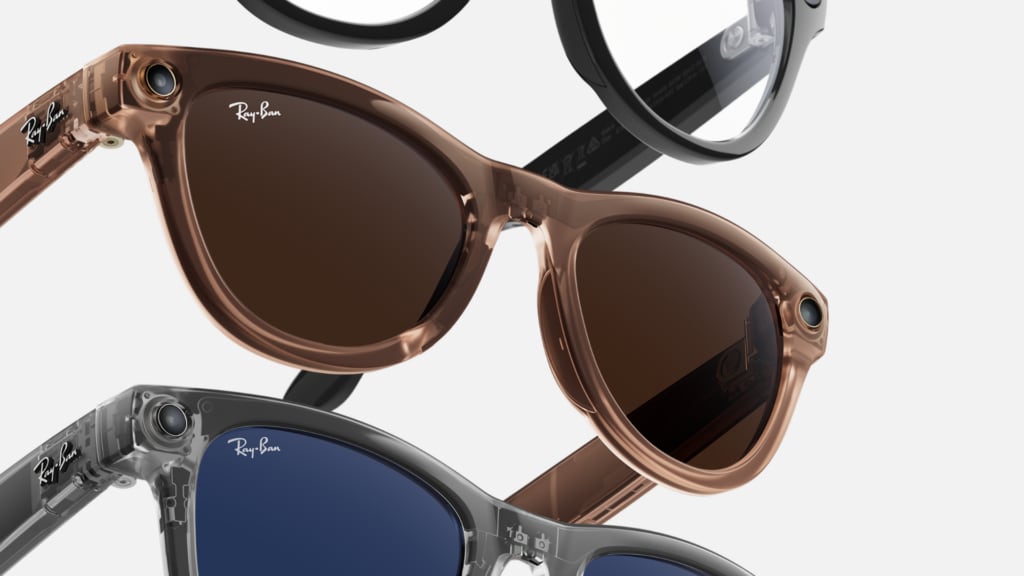
## Shop Smart Glasses: 3 Picks to consider
If you're ready to try smart glasses, T-Mobile carries the Ray-Ban Meta collection. All three styles share the same core tech, so you're really choosing based on fit and personal style.
1. [__Ray-Ban Meta Wayfarer__](https://www.t-mobile.com/accessories/featured/ray-ban-meta-gen-2): The classic pick. The iconic rectangular frame comes in sizes 50mm and 53mm with a high-bridge fit, and is available in a wide range of lens colors including polarized options. A solid choice if you want something versatile that works for both casual and professional settings.
2. [__Oakley Hstn__](https://www.t-mobile.com/accessory/oakley-meta-hstn-glasses-clear-to-amethyst-transitions-lenses?sku=888392682857)__:__ The bold pick. A sporty shield-inspired frame with a clear-to-purple transition lens - a standout option for those who want high-performance style with smart tech built in.
3. [__Oakley Vanguard__](https://www.t-mobile.com/accessory/oakley-meta-vanguard?sku=888392690401)__:__ The performance pick. Available in Prizm 24K and Prizm Black lens options, this frame is built for those who want sport-forward design without sacrificing functionality.
All four models include a 12MP camera, five-mic system, open-ear speakers, Meta AI voice control, 32GB storage, and prescription lens compatibility. Battery life runs up to 4 hours of use, with a charging case that extends that to 32 hours on the go.
[Shop Meta AI Glasses](https://www.t-mobile.com/accessories)
## Privacy, safety, and basic etiquette with smart glasses
Smart glasses can feel new to both you and the people around you. Using them thoughtfully can make a big difference.
Cameras and microphones may make others uncomfortable if they’re not aware they’re being used. It’s a good idea to ask before recording or taking photos.
It also helps to stay aware of your surroundings. Notifications should support your day, not distract you from it.
## The future of smart glasses and AI
Smart glasses are still evolving, and future versions may feel more natural and useful. Many developments focus on making them lighter, more stylish, and easier to wear throughout the day.
[Artificial intelligence](https://www.meta.com/ai-glasses/what-are-smart-glasses/) may also play a bigger role, helping glasses provide more helpful suggestions or context based on what you’re doing. Over time, this could make them feel more like a personal assistant than just a device.
As the technology improves, smart glasses may become more common—but they’re still in an early stage compared to smartphones.
## FAQs about smart glasses
__What do smart glasses do?__
Smart glasses can deliver hands-free notifications, audio, navigation, and in some cases visual overlays - all without needing to take out your phone.
__What are smart glasses used for?__
Smart glasses are used for hands-free access to information, audio, and sometimes visual overlays. They can support tasks like navigation, communication, and entertainment.
__Do smart glasses need Wi-Fi?__
Some features may require Wi-Fi, but many functions work through a Bluetooth connection to your phone.
__Can smart glasses replace a smartphone?__
Not fully. They can complement your phone but usually still rely on it for many functions.
__How long does the battery last?__
Battery life varies by model and usage, but many last several hours on a single charge.
__Can you wear smart glasses with prescription lenses?__
Some models support prescription lenses or offer customization options.
__Are smart glasses safe to use outdoors?__
Many models are designed for everyday use including outdoors, but features and durability vary by model.
__Do smart glasses record everything?__
No, recording typically requires manual activation, though this depends on the design.
__Are smart glasses comfortable?__
Comfort depends on weight and fit. Some feel similar to regular glasses, while others may feel heavier.
__Can you use smart glasses at night?__
Yes, though display visibility and usefulness may depend on lighting conditions.
__Are smart glasses expensive?__
Prices vary widely based on features, from basic audio-focused models to advanced AR versions.
__Do smart glasses work without a phone?__
Some can perform limited tasks independently, but most rely on a connected device.
__Are smart glasses worth it for non-tech users?__
They may be useful if you value convenience and hands-free access, but they’re not essential for everyone.
## Deciding if smart glasses are right for you
Smart glasses are essentially everyday eyewear with built-in technology that can add helpful features to your routine. Once you understand what smart glasses are and how smart glasses work, they tend to feel much less complicated.
They can make certain tasks easier, but they also come with trade-offs like battery life and privacy considerations. Whether they’re right for you depends on how much you value convenience, comfort, and hands-free, wearable tech in your daily life.
__You might also be interested in:__
- [3 Top Picks for Most Stylish Smart Glasses](https://www.t-mobile.com/dialed-in/devices/best-smart-glasses)
- [7 Best Travel Gadgets to Stay Connected](https://www.t-mobile.com/dialed-in/devices/7-best-travel-gadgets)
- [Best Tech Gifts for Dad](https://www.t-mobile.com/dialed-in/devices/gifts-for-dad)
- [Top Gifts for Travelers: Must-Have Travel Picks](https://www.t-mobile.com/dialed-in/devices/gifts-for-travelers)
__Sources:__
- [https://www.cnet.com/tech/computing/features/smart-glasses-revolution-whats-coming-meta-ray-bans-and-beyond/](https://www.cnet.com/tech/computing/features/smart-glasses-revolution-whats-coming-meta-ray-bans-and-beyond/)
- [https://www.meta.com/ai-glasses/what-are-smart-glasses/](https://www.meta.com/ai-glasses/what-are-smart-glasses/)
- [https://www.allaboutvision.com/eyewear/specialty/smart-glasses/](https://www.allaboutvision.com/eyewear/specialty/smart-glasses/)
Tags
- [Education](https://www.t-mobile.com/dialed-in/archive/education)
## Related Articles
NEW
[Read More](https://www.t-mobile.com/dialed-in/accessories/phone-case-buying-guide)
[](https://www.t-mobile.com/dialed-in/accessories/phone-case-buying-guide)
[Accessories](https://www.t-mobile.com/dialed-in/category/accessories)
## [How to Choose the Right Phone Case: A Complete Phone Case Guide](https://www.t-mobile.com/dialed-in/accessories/phone-case-buying-guide)
July 28, 2026
NEW
[Read More](https://www.t-mobile.com/dialed-in/accessories/back-to-school-deals)
[](https://www.t-mobile.com/dialed-in/accessories/back-to-school-deals)
[Accessories](https://www.t-mobile.com/dialed-in/category/accessories)
## [12 Back to School Gifts Students Will Actually Use](https://www.t-mobile.com/dialed-in/accessories/back-to-school-deals)
August 4, 2026
[Read More](https://www.t-mobile.com/dialed-in/accessories/cell-phone-accessories-from-carrier)
[](https://www.t-mobile.com/dialed-in/accessories/cell-phone-accessories-from-carrier)
[Accessories](https://www.t-mobile.com/dialed-in/category/accessories)
## [Looking for a Cell Phone Accessories Store? Your Carrier May Be a Good Place to Start](https://www.t-mobile.com/dialed-in/accessories/cell-phone-accessories-from-carrier)
May 21, 2026
### Get Connected with T-Mobile! Shop Now for your ideal phone.
[Shop now](https://www.t-mobile.com/cell-phones)
## Follow T-Mobile
- [](https://www.instagram.com/tmobile/)
- [](https://www.facebook.com/TMobile)
- [](https://twitter.com/TMobile)
- [](https://www.youtube.com/user/TMobile/custom)
[English](https://t-mobile.com)[Español](https://es.t-mobile.com)
Even more plans
Even more plans
- [Senior phone plans](https://www.t-mobile.com/cell-phone-plans/unlimited-55-senior-discount-plans)
- [International phone plans](https://www.t-mobile.com/cell-phone-plans/international-roaming-plans)
- [International passes](https://www.t-mobile.com/cell-phone-plans/international-roaming-plans/unlimited-calling-data-pass)
- [Home Internet plans](https://www.t-mobile.com/home-internet/plans)
- [Phone and internet bundles](https://www.t-mobile.com/cell-phone-plans/phone-home-internet-bundle)
- [Hotspot plans](https://www.t-mobile.com/cell-phone-plans/affordable-data-plans/hotspots)
- [Business phone plans](https://www.t-mobile.com/business/wireless-business-plans)
Shop devices by brand
Shop devices by brand
- [iPhones](https://www.t-mobile.com/cell-phones/brand/apple)
- [iPads](https://www.t-mobile.com/tablets/brand/apple)
- [Apple Watches](https://www.t-mobile.com/smart-watches/brand/apple)
- [Galaxy phones](https://www.t-mobile.com/cell-phones/brand/samsung)
- [Samsung tablets](https://www.t-mobile.com/tablets/brand/samsung)
- [Samsung watches](https://www.t-mobile.com/smart-watches/brand/samsung)
- [Motorola phones](https://www.t-mobile.com/cell-phones/brand/motorola)
- [Google Pixel phones](https://www.t-mobile.com/cell-phones/brand/google)
New featured cell phones
New featured cell phones
- [New Apple iPhone Duo](https://www.t-mobile.com/cell-phone/apple-iphone-duo)
- [New Apple iPhone 18 Pro](https://www.t-mobile.com/cell-phone/apple-iphone-18-pro)
- [New Apple iPhone 18 Pro Max](https://www.t-mobile.com/cell-phone/apple-iphone-18-pro-max)
- [New Samsung Galaxy Z Fold8](https://www.t-mobile.com/cell-phone/samsung-galaxy-z-fold8)
- [New Google Pixel 11](https://www.t-mobile.com/cell-phone/google-pixel-11)
New featured tablets, smartwatches & more
New featured tablets, smartwatches & more
- [Apple iPad Mini (A17 Pro)](https://www.t-mobile.com/tablet/apple-ipad-mini-a17-pro)
- [Apple iPad (A16)](https://www.t-mobile.com/tablet/apple-ipad-a16)
- [Apple Watch SE 3 40mm](https://www.t-mobile.com/smart-watch/apple-watch-se-3-40mm)
- [T-Mobile Revvl Tab 2](https://www.t-mobile.com/tablet/t-mobile-revvl-tab-2)
- [Samsung Galaxy Tab A11+ 5G](https://www.t-mobile.com/tablet/samsung-galaxy-tab-a11-plus-5g)
- [Samsung Galaxy Watch Ultra2](https://www.t-mobile.com/smart-watch/samsung-galaxy-watch-ultra2)
Helpful consumer guides
Helpful consumer guides
- [Dialed In](https://www.t-mobile.com/dialed-in)
- [Cell Phone BYOD Guide](https://www.t-mobile.com/dialed-in/devices/what-is-byod-bring-your-own-device)
- [The 6 Best Samsung Phones of 2026](https://www.t-mobile.com/dialed-in/devices/best-samsung-phones)
- [iPhone 18 Series: Specs, Price and Release Dates](https://www.t-mobile.com/dialed-in/devices/iphone-18-series-specs-features)
- [How Does Satellite Phone Service Work?](https://www.t-mobile.com/dialed-in/wireless/how-satellite-phone-service-works)
T-Mobile customer benefits
T-Mobile customer benefits
- [TV streaming deals](https://www.t-mobile.com/tv-streaming)
- [T-Mobile Tuesdays](https://www.t-mobile.com/offers/t-mobile-tuesdays)
- [In-flight wi-fi](https://www.t-mobile.com/benefits/travel/in-flight-wifi)
- [Refer-a-Friend](https://referral.t-mobile.com/)
- [Device protection plan](https://www.t-mobile.com/benefits/phone-protection-plans)
- [Protection 360® HomeTech](https://www.t-mobile.com/benefits/phone-protection-plans/p360-home-tech)
Switch to T-Mobile
Switch to T-Mobile
- [How to switch to T-Mobile](https://www.t-mobile.com/resources/how-to-join-us)
- [Try our 5G network](https://www.t-mobile.com/offers/free-trial)
- [Bring your own device](https://www.t-mobile.com/resources/bring-your-own-phone)
- [Switch to T-Mobile from Verizon or AT&T](https://www.t-mobile.com/switch/keep-phone-switch-from-verizon-or-att)
- [Family freedom deal](https://www.t-mobile.com/switch/pay-off-carrier-etf-phone-deal)
- [Cell phone trade-in](https://www.t-mobile.com/devices/phone-trade-in)
Additional support
Additional support
- [View return policy](https://www.t-mobile.com/responsibility/legal/return-policy)
- [Contact us](https://www.t-mobile.com/contact-us)
- [Billing](https://www.t-mobile.com/support/account/whats-impacting-your-bill)
- [Shipping & pickup options](https://www.t-mobile.com/customers/shipping-dates)
- [Free Internet for Students](https://www.t-mobile.com/brand/project-10-million)
- [Redeem a rebate](https://promotions.t-mobile.com/)
- [Domestic Violence Resources](https://www.t-mobile.com/support/account/keeping-customers-safe-connected)
About T-Mobile
About T-Mobile
- [Our Story](https://www.t-mobile.com/our-story)
- [T-Mobile careers](https://careers.t-mobile.com/)
- [Privacy Center](https://www.t-mobile.com/privacy-center)
- [Newsroom](https://www.t-mobile.com/news)
- [Corporate Responsibility](https://www.t-mobile.com/responsibility)
[](https://www.t-mobile.com)
- [About](https://www.t-mobile.com/our-story)
- [Investor relations](https://investor.t-mobile.com/default.aspx)
- [Press](https://www.t-mobile.com/news)
- [Careers](https://careers.t-mobile.com)
- [Deutsche Telekom](https://www.telekom.com/en)
- [Puerto Rico](https://www.t-mobilepr.com/)
- [Privacy Notice](https://www.t-mobile.com/privacy-center/privacy-notices/t-mobile-privacy-notice)
- [Trust Center](https://security.t-mobile.com/)
- [Privacy Center](https://www.t-mobile.com/privacy-center)
- [Consumer information](https://www.t-mobile.com/responsibility/consumer-info)
- [Public safety/911](https://www.t-mobile.com/responsibility/consumer-info/safety/9-1-1)
- [Terms & conditions](https://www.t-mobile.com/responsibility/legal/terms-and-conditions)
- [Terms of use](https://www.t-mobile.com/responsibility/consumer-info/policies/terms-of-use)
- [Accessibility](https://www.t-mobile.com/responsibility/consumer-info/accessibility-policy)
- [Open Internet](https://www.t-mobile.com/responsibility/consumer-info/policies/internet-service)
- [Do Not Sell or Share My Personal Information](javascript:void%280%29)
- [Licenses & Patents](https://www.t-mobile.com/responsibility/legal/licenses-and-patents)
- [Consumer Health Data Privacy Notice](https://www.t-mobile.com/privacy-center/privacy-notices/t-mobile-privacy-notice.html#health-data-privacy-notice)
- [T-Mobile, the T logo, Magenta and the magenta color are registered trademarks of Deutsche Telekom AG.](https://www.t-mobile.com)
- [](https://www.instagram.com/tmobile/)
- [](https://www.facebook.com/TMobile)
- [](https://twitter.com/TMobile)
- [](https://www.youtube.com/user/TMobile/custom)
© 2026 T‑Mobile USA, Inc.
Top