[Skip to content](https://www.t-mobile.com/dialed-in/accessories/screen-protector-buying-guide-clear-glass-privacy-options#maincontent)

Hey, looks like you need help finding something. I am here to chat if you have any questions
Skip to main content Skip to footer
[Wireless](https://www.t-mobile.com/)
[Business](https://www.t-mobile.com/business)
[Prepaid](https://prepaid.t-mobile.com/home)
[Internet](https://www.t-mobile.com/home-internet)
[](https://www.t-mobile.com)
Log in
[Plans](https://www.t-mobile.com/cell-phone-plans)
[Unlimited Phone Plans](https://www.t-mobile.com/cell-phone-plans)[Unlimited Age 55+](https://www.t-mobile.com/cell-phone-plans/unlimited-55-senior-discount-plans)[Military & Veterans](https://www.t-mobile.com/cell-phone-plans/military-discount-plans)[First Responder](https://www.t-mobile.com/cell-phone-plans/first-responder-discounts)[College Students](https://www.t-mobile.com/cell-phone-plans/student-discounts)[5G Home Internet Plans](https://www.t-mobile.com/home-internet/plans)[Fiber Internet Plans](https://www.t-mobile.com/home-internet/fiber)[Watch & Tablet Plans](https://www.t-mobile.com/cell-phone-plans/affordable-data-plans)[Prepaid Phone Plans](https://prepaid.t-mobile.com/prepaid-plans)[Business Phone Plans](https://www.t-mobile.com/business/wireless-business-plans)
[Phones & devices](https://www.t-mobile.com/cell-phones)
[Cell phones](https://www.t-mobile.com/cell-phones)[5G phones](https://www.t-mobile.com/5g/phones)[Tablets](https://www.t-mobile.com/tablets)[Smartwatches](https://www.t-mobile.com/smart-watches)[Hotspots & more](https://www.t-mobile.com/hotspots-iot-connected-devices)[Accessories](https://www.t-mobile.com/accessories)[Bring your own device](https://www.t-mobile.com/resources/bring-your-own-phone)[Tech Gift Ideas](https://www.t-mobile.com/devices/tech-gifts)
[Deals](https://www.t-mobile.com/offers)
[See all deals](https://www.t-mobile.com/offers)[Apple](https://www.t-mobile.com/offers/apple-iphone-deals)[Samsung](https://www.t-mobile.com/offers/samsung-phone-deals)[Motorola](https://www.t-mobile.com/offers/motorola-phone-deals)[Google](https://www.t-mobile.com/offers/google-phone-deals)[Revvl](https://www.t-mobile.com/offers/t-mobile-revvl-phone-deals)[Free & Zero Down Phones](https://www.t-mobile.com/switch/free-cell-phone-with-plan)
[Coverage](https://www.t-mobile.com/coverage/network)
[Our network](https://www.t-mobile.com/coverage/network)[4G & 5G Coverage map](https://www.t-mobile.com/coverage/coverage-map)[What is 5G](https://www.t-mobile.com/5g)[Satellite Phone Service](https://www.t-mobile.com/coverage/satellite-phone-service)[Rural & Small Towns](https://www.t-mobile.com/coverage/small-towns-rural-areas)[Try our network](https://www.t-mobile.com/offers/free-trial)[5G news](https://www.t-mobile.com/news/category/network)[Home Internet](https://www.t-mobile.com/home-internet/eligibility)
[Join Us](https://www.t-mobile.com/resources/how-to-join-us)
[How to switch](https://www.t-mobile.com/resources/how-to-join-us)[Bring your own phone](https://www.t-mobile.com/resources/bring-your-own-phone)[Keep your number](https://www.t-mobile.com/resources/keep-your-number)[Keep & switch](https://www.t-mobile.com/switch/keep-phone-switch-from-verizon-or-att)[Benefits](https://www.t-mobile.com/benefits)[Find your reason](https://www.t-mobile.com/membership)[T-Mobile Tuesdays](https://www.t-mobile.com/offers/t-mobile-tuesdays)
[Contact & support](https://www.t-mobile.com/contact-us)
[](https://www.t-mobile.com)[1-800-T-MOBILE](tel:1-800-866-2453)[Check order status](https://www.t-mobile.com/orders/check-order)[Help & support](https://www.t-mobile.com/support)[](https://www.t-mobile.com)
[Cart](https://www.t-mobile.com/cart)
Search
- POPULAR
[Search](javascript:void%280%29)
My account
more from T-Mobile
- [Wireless](https://www.t-mobile.com/)
- [Business](https://www.t-mobile.com/business)
- [Prepaid](https://prepaid.t-mobile.com/home)
- [Internet](https://www.t-mobile.com/home-internet)
Legal
- [Privacy Policy](https://www.t-mobile.com/privacy-center/our-practices/privacy-policy)
- [Do Not Sell My Personal Information](javascript:void%280%29)
- [Privacy Center](https://www.t-mobile.com/privacy-center)
[Log in](https://www.t-mobile.com)
[Bill pay](https://www.t-mobile.com/signin?state=eyJpbnRlbnQiOiJQYXltZW50IiwiYm9va21hcmtVcmwiOiJodHRwczovL215LnQtbW9iaWxlLmNvbS9vbmV0aW1lcGF5bWVudCJ9) [Add a line](https://www.t-mobile.com/commerce/device-intent) [Upgrade](https://www.t-mobile.com/purchase/shop) [Check order status](https://www.t-mobile.com/orders/check-order) [Ask the Community](https://www.t-mobile.com/community)
[Dialed In](https://www.t-mobile.com/dialed-in)
- [All Blogs](https://www.t-mobile.com/dialed-in/latest)
- [Devices](https://www.t-mobile.com/dialed-in/category/devices)
- [Accessories](https://www.t-mobile.com/dialed-in/category/accessories)
- [Tips & Tricks](https://www.t-mobile.com/dialed-in/category/tips-tricks)
- [Wireless 101](https://www.t-mobile.com/dialed-in/category/wireless)
- [The Signal](https://www.t-mobile.com/home-internet/the-signal/)
- [Newsroom](https://www.t-mobile.com/news)
- [All Blogs](https://www.t-mobile.com/dialed-in/latest)
- [Devices](https://www.t-mobile.com/dialed-in/category/devices)
- [Accessories](https://www.t-mobile.com/dialed-in/category/accessories)
- [Tips & Tricks](https://www.t-mobile.com/dialed-in/category/tips-tricks)
- [Wireless 101](https://www.t-mobile.com/dialed-in/category/wireless)
- [The Signal](https://www.t-mobile.com/home-internet/the-signal/)
- [Newsroom](https://www.t-mobile.com/news)
1. [Dialed In](https://www.t-mobile.com/dialed-in)
2. Category:[Accessories](https://www.t-mobile.com/dialed-in/category/accessories)
[AccessoriesCategory](https://www.t-mobile.com/dialed-in/category/accessories)
# Screen Protector Guide: Clear Glass, Privacy & Camera Lens Protection Options
Published: March 10, 2026
|8 min read
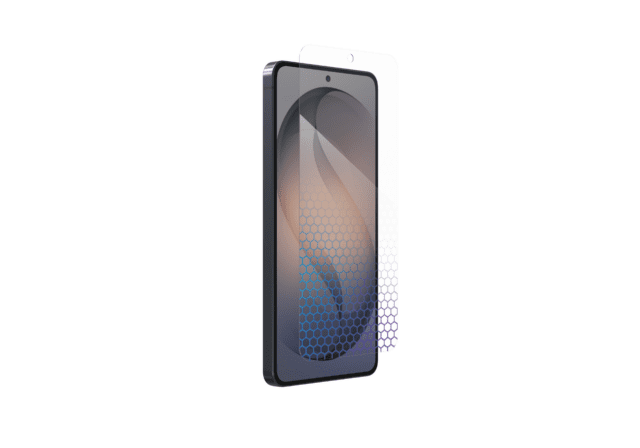
Buying a screen protector shouldn’t feel like guesswork, but with so many options available, it’s not always clear which one actually fits your needs. A standard clear glass screen protector offers everyday scratch and impact protection, while a privacy screen protector helps shield sensitive information; then there are budget-friendly screen protector options in both clear and privacy styles at a lower cost.
- Share "Screen Protector Guide: Clear Glass, Privacy & Camera Lens Protection Options " on X
- Share "Screen Protector Guide: Clear Glass, Privacy & Camera Lens Protection Options " on Facebook
- Share "Screen Protector Guide: Clear Glass, Privacy & Camera Lens Protection Options " on LinkedIn
In this article, we'll break down the key features of normal glass, privacy, and budget-friendly screen protectors, discuss important considerations when selecting a protector, explore lens protector add-ons, and address common questions about protecting your screen.
*\*This guide was created by T-Mobile to help you explore screen protector options in our store. The opinions expressed here reflect our editorial perspective based on publicly available features, specifications, and articles.*
[SHOP T-MOBILE SCREEN PROTECTORS](https://www.t-mobile.com/accessories/category/screen-protectors)
## What are the benefits of using a screen protector?
1. __Screen Protection:__ Guards against scratches, smudges, and minor drops.
2. __Reduced Eye Strain:__ Some privacy protectors offer anti-glare features, improving readability in bright environments.
3. __Enhanced Privacy:__ Limits the viewing angle, preventing unauthorized viewing.
## What are the different types of screen protectors?
1. __Clear Screen Protectors__ – Designed to maintain your phone’s original display clarity and touch sensitivity while providing everyday scratch and impact protection.
2. __Privacy Screen Protectors__ – Limit side viewing angles to help keep sensitive information hidden from people nearby.
3. __Anti-Glare (Matte) Screen Protectors__ – Reduce reflections and glare, making the screen easier to see in bright environments.
4. __Blue Light Filtering Screen Protectors__ – Help reduce blue light exposure to improve eye comfort during extended use.
5. __Camera Lens Protectors__ – Protect rear camera lenses from scratches and minor damage.
6. __Liquid Screen Protectors__ – A wipe-on coating that adds an extra layer of scratch resistance, though typically with less impact protection than traditional screen protectors.
## Why privacy screen protectors matter
If you frequently use your phone in public, privacy screen protectors can offer peace of mind by protecting sensitive information and reducing screen damage. These protectors limit viewing angles, ensuring that only you can clearly view your screen.
They’re especially beneficial in crowded environments, such as public transportation, coffee shops, and offices, where your private information could easily be exposed.
## Premium screen protection: Quality without compromise
For users seeking premium quality, ZAGG offers robust solutions designed with advanced technologies to ensure maximum privacy and durability.
ZAGG screen protectors offer superior protection through features such as advanced impact resistance, anti-microbial technology, and enhanced touch sensitivity. Options include:
- __Clear & Premium Protection:__ [ZAGG Glass XTR5](https://www.t-mobile.com/accessories), the latest generation of ZAGG’s premium screen protection, offers advanced impact resistance, ultra-clear clarity, and blue light filtration for added eye comfort. All ZAGG screen protectors include an EZ Apply Tray for a dust-free, precise installation.
- __Privacy (4-way):__ [ZAGG Glass Elite Privacy 360](https://nam02.safelinks.protection.outlook.com/) provides privacy protection from all angles, making your screen completely secure against unwanted eyes.
- __Privacy (2-way):__ [ZAGG Fusion 2-way](https://nam02.safelinks.protection.outlook.com/) offers privacy from side views, ideal for everyday use in public settings.
Explore all compatible premium screen protectors: [ZAGG Premium Screen Protectors](https://www.t-mobile.com/accessories/brand/zagg)
## Budget-friendly screen protection: Reliable & affordable
If you're looking for reliable protection that won't break the bank, GoTo provides budget-friendly solutions designed to protect your screen without sacrificing functionality.
Key budget-friendly options include:
- __Clear Tempered Glass:__ [GoTo Tempered Glass](https://nam02.safelinks.protection.outlook.com/) offers essential protection against scratches and everyday wear.
- __Privacy (2-way):__ [GoTo 2-way Privacy](https://nam02.safelinks.protection.outlook.com/) provides solid privacy protection at an affordable price, shielding your screen from side views without significantly affecting visibility or touch sensitivity.
Discover budget-friendly privacy screen protectors here: [GoTo Budget-Friendly Protectors](https://www.t-mobile.com/accessories)
## How to choose the right screen protector: 4 considerations
Choosing the best privacy screen protector involves considering several factors:
1. __Privacy level (2-way vs. 4-way):__
- 2-way protectors block visibility from the sides only, ideal for typical use.
- 4-way protectors obscure visibility from all angles, perfect for high-security environments.
2. __Clarity and brightness:__ Premium protectors maintain optimal screen clarity, while budget options may slightly dim your screen.
3. __Durability and build quality:__ Consider screen protector options designed for strong scratch resistance and reliable impact protection to help extend the life of your device.
4. __Device compatibility:__ Ensure the protector fits your specific device model, avoiding compatibility issues.
## Enhance your device protection: Lens protector add-ons
Modern smartphones feature increasingly sophisticated and prominent camera modules, making them susceptible to damage. Lens protectors add another layer of protection to keep your photos crystal clear and your lenses scratch-free.
### 3 Benefits of lens protectors
1. Safeguarding against scratches and smudges
2. Protecting against minor impacts and abrasions
3. Preserving camera quality, clarity, and photo sharpness
Choose a suitable lens protector for your device here: [Lens Protectors](https://www.t-mobile.com/accessories)
## FAQs about screen protectors
__How to apply a screen protector__
Applying a screen protector carefully helps prevent dust, bubbles, and misalignment. To apply a screen protector, follow these 6 steps:
1\. Wash your hands to avoid transferring dust or oils.
2\. Clean the screen thoroughly with an alcohol wipe and microfiber cloth.
3\. Remove any remaining dust using a dust sticker or tape.
4\. Align the screen protector with the edges and cutouts, using an alignment tray if included.
5\. Lower it slowly onto the screen, starting from one side.
6\. Press gently in the center and smooth any bubbles toward the edges with a cloth or card.
__How to remove a screen protector__
Removing a screen protector can feel tricky, but with the right method, it’s quick and straightforward. Follow these 3 steps to safely remove your protector:
1\. Gently lift a corner of the protector using your fingernail or a thin plastic card.
2\. Slowly peel the protector off the screen to avoid leaving adhesive residue.
3\. Clean your screen afterward with a microfiber cloth and screen cleaning solution.
__How to get air bubbles out of a screen protector__
Air bubbles under your screen protector can be annoying, but they're typically easy to remove. Here's how you can eliminate them:
\- For small bubbles, gently press and slide the bubble toward the edge with your finger or a plastic card.
\- For stubborn bubbles, partially lift the protector near the bubble, then smoothly reapply while pressing firmly to remove trapped air.
__Is 9H the highest-grade screen protector?__
"9H" refers to the hardness rating on the Mohs scale, indicating high scratch resistance. 9H is among the highest hardness ratings available for screen protectors, providing excellent protection against scratches and minor impacts.
__How to fix a broken screen protector__
If your screen protector cracks or breaks, fixing it might not be practical - but replacing it is simple. Follow this quick advice:
\- Broken or cracked protectors can't effectively be repaired; it's best to replace them.
\- Remove the damaged protector carefully, clean the screen thoroughly, and install a new protector for optimal device safety.
__What is the difference between a 2-way and 4-way privacy screen protector?__
A 2-way privacy screen protector prevents visibility from side angles, allowing direct viewing from straight ahead. A 4-way privacy protector obscures visibility from all angles except directly in front, providing enhanced privacy protection.
__Can privacy screen protectors affect screen sensitivity?__
Quality privacy screen protectors like those from ZAGG or GoTo minimally affect screen sensitivity. Premium protectors typically maintain touch responsiveness, while lower-quality alternatives may slightly reduce sensitivity.
__How often should I replace my screen protector?__
Screen protectors typically last 6-12 months, depending on use and wear. Replace your protector whenever you notice visible cracks, chips, or reduced clarity.
__Do privacy screen protectors make the screen darker?__
Some privacy screen protectors slightly reduce brightness, typically by about 10-15%. Premium protectors usually minimize this effect, maintaining excellent clarity and brightness.
__Can a privacy screen protector protect my phone from drops?__
Privacy protectors primarily guard against scratches, fingerprints, and minor impacts. While tempered glass protectors offer basic drop protection, combining them with a durable case significantly enhances overall device protection.
## Ready to upgrade your privacy and screen protection?
Choosing the right privacy screen protector ensures your private information stays secure while also safeguarding your smartphone's screen from everyday hazards. Premium protectors from brands like ZAGG deliver high-end privacy, clarity, and durability, while budget-friendly alternatives from GoTo provide practical, reliable protection.
Enhancing your protection with a lens protector ensures comprehensive coverage for your device, keeping you secure, clear, and connected.
Explore the latest [privacy screen protectors](https://www.t-mobile.com/accessories/category/screen-protectors) and [lens protectors](https://www.t-mobile.com/accessories/category/screen-protectors) to find the perfect fit for your device.
__You may also be interested in:__
[Headphones vs. Earbuds Buying Guide: Find the Right Fit for You](https://www.t-mobile.com/dialed-in/devices/headphones-vs-earbuds-buying-guide)
Tags
- [Security and Privacy](https://www.t-mobile.com/dialed-in/archive/security-and-privacy)
## Related Articles
NEW
[Read More](https://www.t-mobile.com/dialed-in/accessories/phone-case-buying-guide)
[](https://www.t-mobile.com/dialed-in/accessories/phone-case-buying-guide)
[Accessories](https://www.t-mobile.com/dialed-in/category/accessories)
## [How to Choose the Right Phone Case: A Complete Phone Case Guide](https://www.t-mobile.com/dialed-in/accessories/phone-case-buying-guide)
July 28, 2026
NEW
[Read More](https://www.t-mobile.com/dialed-in/accessories/what-is-a-smart-ring)
[](https://www.t-mobile.com/dialed-in/accessories/what-is-a-smart-ring)
[Accessories](https://www.t-mobile.com/dialed-in/category/accessories)
## [What is a Smart Ring? How They Work, Features & More](https://www.t-mobile.com/dialed-in/accessories/what-is-a-smart-ring)
October 6, 2026
NEW
[Read More](https://www.t-mobile.com/dialed-in/accessories/best-apple-headphones-for-you)
[](https://www.t-mobile.com/dialed-in/accessories/best-apple-headphones-for-you)
[Accessories](https://www.t-mobile.com/dialed-in/category/accessories)
## [Which Apple AirPods are Right for You? A 2026 Comparison](https://www.t-mobile.com/dialed-in/accessories/best-apple-headphones-for-you)
September 18, 2026
### Get Connected with T-Mobile! Shop Now for your ideal phone.
[Shop now](https://www.t-mobile.com/cell-phones)
## Follow T-Mobile
- [](https://www.instagram.com/tmobile/)
- [](https://www.facebook.com/TMobile)
- [](https://twitter.com/TMobile)
- [](https://www.youtube.com/user/TMobile/custom)
[English](https://t-mobile.com)[Español](https://es.t-mobile.com)
Even more plans
Even more plans
- [Senior phone plans](https://www.t-mobile.com/cell-phone-plans/unlimited-55-senior-discount-plans)
- [International phone plans](https://www.t-mobile.com/cell-phone-plans/international-roaming-plans)
- [International passes](https://www.t-mobile.com/cell-phone-plans/international-roaming-plans/unlimited-calling-data-pass)
- [Home Internet plans](https://www.t-mobile.com/home-internet/plans)
- [Phone and internet bundles](https://www.t-mobile.com/cell-phone-plans/phone-home-internet-bundle)
- [Hotspot plans](https://www.t-mobile.com/cell-phone-plans/affordable-data-plans/hotspots)
- [Business phone plans](https://www.t-mobile.com/business/wireless-business-plans)
Shop devices by brand
Shop devices by brand
- [iPhones](https://www.t-mobile.com/cell-phones/brand/apple)
- [iPads](https://www.t-mobile.com/tablets/brand/apple)
- [Apple Watches](https://www.t-mobile.com/smart-watches/brand/apple)
- [Galaxy phones](https://www.t-mobile.com/cell-phones/brand/samsung)
- [Samsung tablets](https://www.t-mobile.com/tablets/brand/samsung)
- [Samsung watches](https://www.t-mobile.com/smart-watches/brand/samsung)
- [Motorola phones](https://www.t-mobile.com/cell-phones/brand/motorola)
- [Google Pixel phones](https://www.t-mobile.com/cell-phones/brand/google)
New featured cell phones
New featured cell phones
- [New Apple iPhone Duo](https://www.t-mobile.com/cell-phone/apple-iphone-duo)
- [New Apple iPhone 18 Pro](https://www.t-mobile.com/cell-phone/apple-iphone-18-pro)
- [New Apple iPhone 18 Pro Max](https://www.t-mobile.com/cell-phone/apple-iphone-18-pro-max)
- [New Samsung Galaxy Z Fold8](https://www.t-mobile.com/cell-phone/samsung-galaxy-z-fold8)
- [New Google Pixel 11](https://www.t-mobile.com/cell-phone/google-pixel-11)
New featured tablets, smartwatches & more
New featured tablets, smartwatches & more
- [Apple iPad Mini (A17 Pro)](https://www.t-mobile.com/tablet/apple-ipad-mini-a17-pro)
- [Apple iPad (A16)](https://www.t-mobile.com/tablet/apple-ipad-a16)
- [Apple Watch SE 3 40mm](https://www.t-mobile.com/smart-watch/apple-watch-se-3-40mm)
- [T-Mobile Revvl Tab 2](https://www.t-mobile.com/tablet/t-mobile-revvl-tab-2)
- [Samsung Galaxy Tab A11+ 5G](https://www.t-mobile.com/tablet/samsung-galaxy-tab-a11-plus-5g)
- [Samsung Galaxy Watch Ultra2](https://www.t-mobile.com/smart-watch/samsung-galaxy-watch-ultra2)
Helpful consumer guides
Helpful consumer guides
- [Dialed In](https://www.t-mobile.com/dialed-in)
- [Cell Phone BYOD Guide](https://www.t-mobile.com/dialed-in/devices/what-is-byod-bring-your-own-device)
- [The 6 Best Samsung Phones of 2026](https://www.t-mobile.com/dialed-in/devices/best-samsung-phones)
- [iPhone 18 Series: Specs, Price and Release Dates](https://www.t-mobile.com/dialed-in/devices/iphone-18-series-specs-features)
- [How Does Satellite Phone Service Work?](https://www.t-mobile.com/dialed-in/wireless/how-satellite-phone-service-works)
T-Mobile customer benefits
T-Mobile customer benefits
- [TV streaming deals](https://www.t-mobile.com/tv-streaming)
- [T-Mobile Tuesdays](https://www.t-mobile.com/offers/t-mobile-tuesdays)
- [In-flight wi-fi](https://www.t-mobile.com/benefits/travel/in-flight-wifi)
- [Refer-a-Friend](https://referral.t-mobile.com/)
- [Device protection plan](https://www.t-mobile.com/benefits/phone-protection-plans)
- [Protection 360® HomeTech](https://www.t-mobile.com/benefits/phone-protection-plans/p360-home-tech)
Switch to T-Mobile
Switch to T-Mobile
- [How to switch to T-Mobile](https://www.t-mobile.com/resources/how-to-join-us)
- [Try our 5G network](https://www.t-mobile.com/offers/free-trial)
- [Bring your own device](https://www.t-mobile.com/resources/bring-your-own-phone)
- [Switch to T-Mobile from Verizon or AT&T](https://www.t-mobile.com/switch/keep-phone-switch-from-verizon-or-att)
- [Family freedom deal](https://www.t-mobile.com/switch/pay-off-carrier-etf-phone-deal)
- [Cell phone trade-in](https://www.t-mobile.com/devices/phone-trade-in)
Additional support
Additional support
- [View return policy](https://www.t-mobile.com/responsibility/legal/return-policy)
- [Contact us](https://www.t-mobile.com/contact-us)
- [Billing](https://www.t-mobile.com/support/account/whats-impacting-your-bill)
- [Shipping & pickup options](https://www.t-mobile.com/customers/shipping-dates)
- [Free Internet for Students](https://www.t-mobile.com/brand/project-10-million)
- [Redeem a rebate](https://promotions.t-mobile.com/)
- [Domestic Violence Resources](https://www.t-mobile.com/support/account/keeping-customers-safe-connected)
About T-Mobile
About T-Mobile
- [Our Story](https://www.t-mobile.com/our-story)
- [T-Mobile careers](https://careers.t-mobile.com/)
- [Privacy Center](https://www.t-mobile.com/privacy-center)
- [Newsroom](https://www.t-mobile.com/news)
- [Corporate Responsibility](https://www.t-mobile.com/responsibility)
[](https://www.t-mobile.com)
- [About](https://www.t-mobile.com/our-story)
- [Investor relations](https://investor.t-mobile.com/default.aspx)
- [Press](https://www.t-mobile.com/news)
- [Careers](https://careers.t-mobile.com)
- [Deutsche Telekom](https://www.telekom.com/en)
- [Puerto Rico](https://www.t-mobilepr.com/)
- [Privacy Notice](https://www.t-mobile.com/privacy-center/privacy-notices/t-mobile-privacy-notice)
- [Trust Center](https://security.t-mobile.com/)
- [Privacy Center](https://www.t-mobile.com/privacy-center)
- [Consumer information](https://www.t-mobile.com/responsibility/consumer-info)
- [Public safety/911](https://www.t-mobile.com/responsibility/consumer-info/safety/9-1-1)
- [Terms & conditions](https://www.t-mobile.com/responsibility/legal/terms-and-conditions)
- [Terms of use](https://www.t-mobile.com/responsibility/consumer-info/policies/terms-of-use)
- [Accessibility](https://www.t-mobile.com/responsibility/consumer-info/accessibility-policy)
- [Open Internet](https://www.t-mobile.com/responsibility/consumer-info/policies/internet-service)
- [Do Not Sell or Share My Personal Information](javascript:void%280%29)
- [Licenses & Patents](https://www.t-mobile.com/responsibility/legal/licenses-and-patents)
- [Consumer Health Data Privacy Notice](https://www.t-mobile.com/privacy-center/privacy-notices/t-mobile-privacy-notice.html#health-data-privacy-notice)
- [T-Mobile, the T logo, Magenta and the magenta color are registered trademarks of Deutsche Telekom AG.](https://www.t-mobile.com)
- [](https://www.instagram.com/tmobile/)
- [](https://www.facebook.com/TMobile)
- [](https://twitter.com/TMobile)
- [](https://www.youtube.com/user/TMobile/custom)
© 2026 T‑Mobile USA, Inc.
Top